English
 中文 (台灣)
 日本語
 한국어
 Italiano
 Français
 Português
 Español


How to Download Taylor Swift Songs to MP3: 4 Easy Ways Worth Trying
- Category:Spotify Music Tips
- Xiny
- 2026-11-19
If you’re a Taylor Swift fan, you’ve probably found yourself wanting to keep your favorite songs close at hand. Maybe you want to listen to Cruel Summer on a long flight, play Love Story through your car stereo, or build a personal music library filled with your favorite Taylor Swift albums.
However, downloading Taylor Swift songs as MP3 files isn’t always easy. Streaming services only allow offline listening within their apps, while some free download sites are filled with intrusive ads and unreliable files.
So, what’s the best way to get Taylor Swift songs in MP3 format? In this guide, we’ll explore four methods, from buying digital downloads to using a desktop converter, and help you find the best way to save and enjoy your favorite tracks offline.
Can You Download Taylor Swift Songs as MP3 Files?
Yes. You can get Taylor Swift songs as MP3 files from digital stores that offer this format. Some stores sell music in AAC or other audio formats, which may require conversion if you specifically want MP3 files.
Streaming services work differently. Spotify, Apple Music, and YouTube Music allow eligible subscribers to download songs for offline listening, but these downloads remain within their respective apps. They aren’t standalone MP3 files that you can freely transfer to a USB drive or another music player.
Another option is direct downloads. Some tracks are available for download when creators enable the feature. In these cases, the file format depends on what the creator provides.
The main difference comes down to the type of files you get and how you can use them afterward. Some methods are designed for in-app listening, while others provide audio files you can store, transfer, and play across different devices. Knowing what each method offers will help you choose the one that works best for your needs.
Comparison of 4 Ways to Download Taylor Swift Songs
Before choosing a method, take a look at how these options compare. The table below highlights their costs, file availability, and the types of listeners they suit best.
| Method | Payment | Independent MP3 Files | Full Album Support | Best For |
| Digital Music Stores | Usually paid per song or album | Yes, if the store offers MP3 | Yes, when available | Purchasing music |
| Streaming App Downloads | Usually requires an eligible subscription | No | Offline within the app | Offline listening |
| MusicFre | Software pricing applies | MP3 output supported | Supports songs, albums, and playlists | Local music management |
| Direct Downloads | Depends on the source | Depends on the provided file | Depends on the download offered | Creator-enabled downloads |
Method 1. Purchase Taylor Swift Songs from Digital Music Stores
If you want a straightforward way to obtain downloadable music files, purchasing Taylor Swift songs from a legitimate digital music store is a good place to start.
Unlike subscription-based streaming downloads, purchased music may be available as a separate file that you can store locally and import into compatible music players.
Where to Find Taylor Swift Songs
You can start by searching for Taylor Swift in digital music stores such as:
- Amazon Music Digital Store: Offers individual song and album purchases in MP3 format where available.
- iTunes Store: Offers purchased songs in DRM-free AAC format, generally encoded at 256 kbps. These files are not MP3 by default.
- Other Authorized Music Retailers: Depending on your country or region, additional stores may offer downloadable Taylor Swift albums and individual tracks.
Keep in mind that music catalogs, purchasing options, and available formats can vary by location.
How to Purchase and Download Taylor Swift Songs
Step 1. Open a digital music store and search for Taylor Swift or the specific song you want.
Step 2. Browse the available results and select an individual track or full album.
Step 3. Check the product details, including the price, audio format, and download availability.
Step 4. Complete the purchase using the store’s checkout process.
Step 5. Open your purchased music library and download the files to your device.
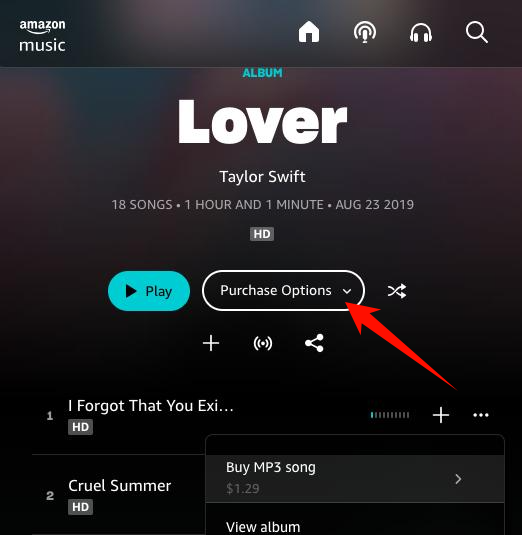
Once the download is complete, check the file extension to see which audio format you received. If the store provides MP3 files, you can import them directly into compatible players. If you receive AAC files, you may use a suitable audio converter to create MP3 copies where permitted.
What Are the Advantages of Buying Digital Music?
- Access to individual songs without purchasing an entire album.
- Downloadable audio files that can be stored locally, depending on the retailer.
- Greater flexibility in organizing and playing your music across supported devices.
The main drawback is the cost. If you want to purchase several Taylor Swift albums, buying each one separately can become expensive. Also, not every digital music store provides MP3 downloads, so check the available format before purchasing.
Method 2. Save Taylor Swift Songs for Offline Listening
If you simply want to listen without an internet connection, your existing streaming app may already offer a convenient solution.
With an eligible Spotify, Apple Music, or YouTube Music subscription, you can save supported albums and playlists for playback within the app. This is useful when traveling, commuting, or listening in places with limited internet access.
How to Download Taylor Swift Songs for Offline Listening
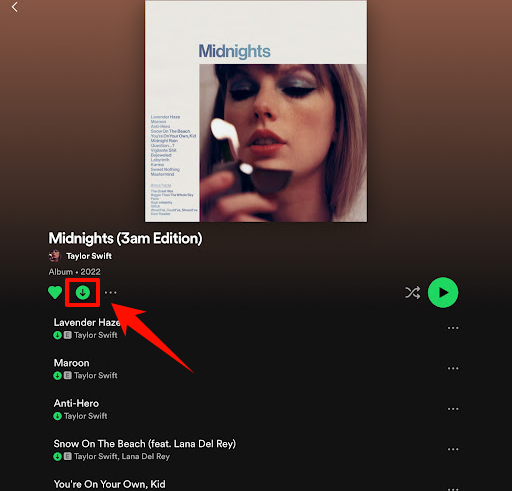
Step 1. Open your streaming app and find the Taylor Swift album or playlist you want.
Step 2. Add the selected music to your library if required.
Step 3. Tap or click the Download button to save it for offline playback.
Step 4. Wait until the download is complete.
Step 5. Open your downloaded music and test playback without an internet connection.
What Are the Limitations of Streaming App Downloads?
In short, streaming downloads are ideal if you simply want to listen offline. However, if you want independent MP3 files for a local music library, you’ll need a different approach.
Method 3. Convert Taylor Swift Albums and Playlists to MP3 with MusicFre
If you enjoy collecting Taylor Swift albums and playlists, managing individual songs one by one can become time-consuming. MusicFre offers a more efficient desktop solution, allowing you to batch-convert songs, albums, and playlists from supported streaming platforms into MP3 and other audio formats.






Why Choose MusicFre for Music Conversion?
How to Convert Supported Music to MP3 with MusicFre
Step 1. Launch MusicFre on your computer and select your preferred music platform.
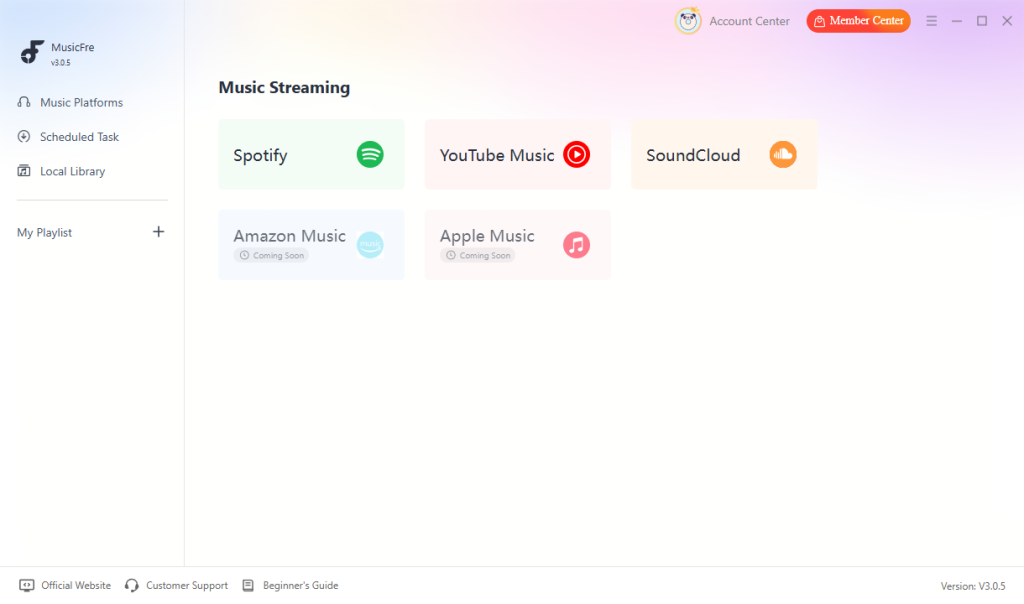
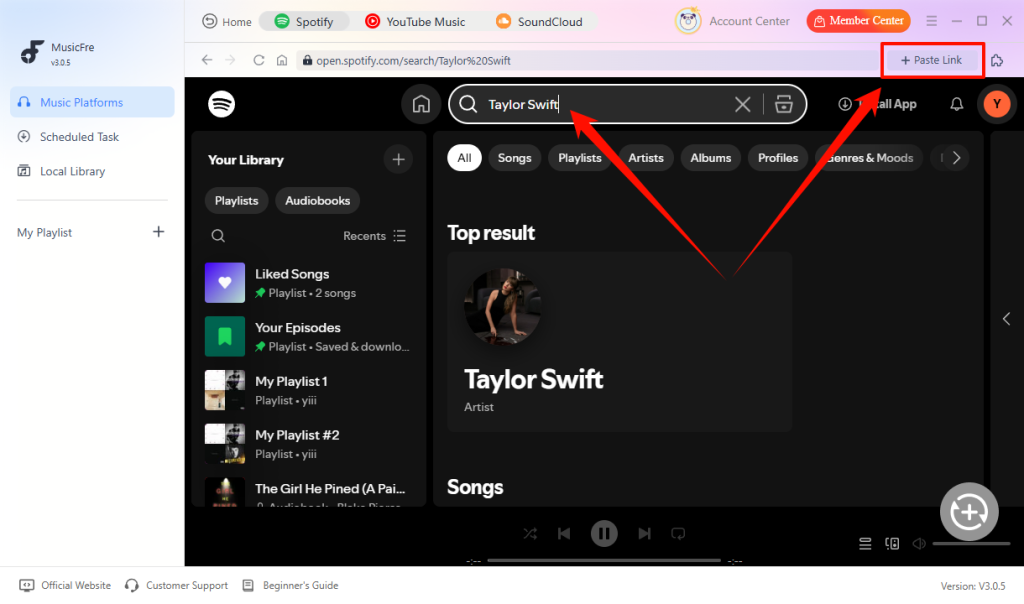
Step 2. Search for “Taylor Swift” or paste a link to one of her popular playlists to add the music.
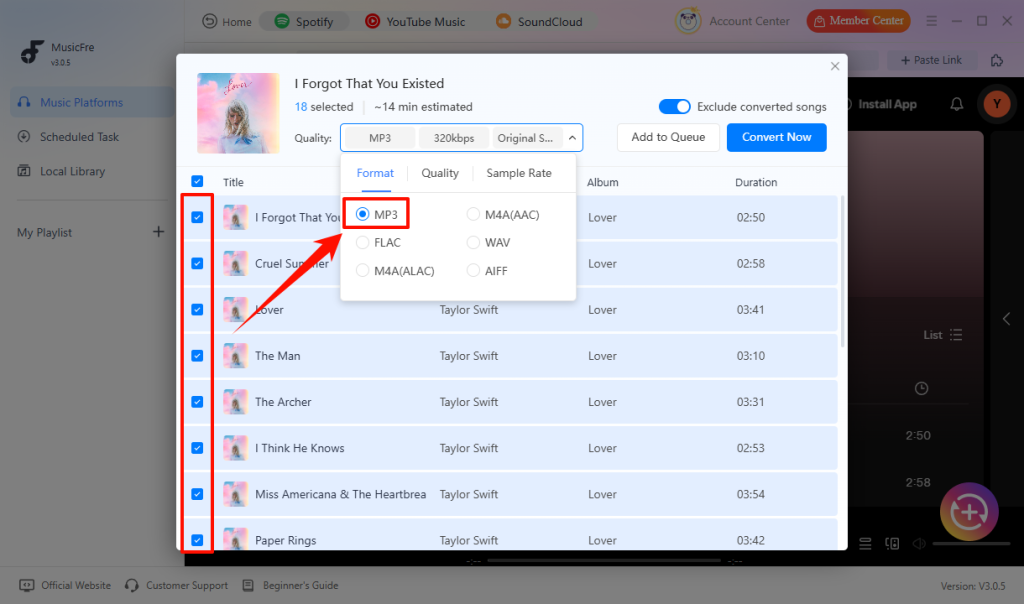
Step 3. Once the analysis is complete, select the tracks you want to convert and choose MP3 as the output format.
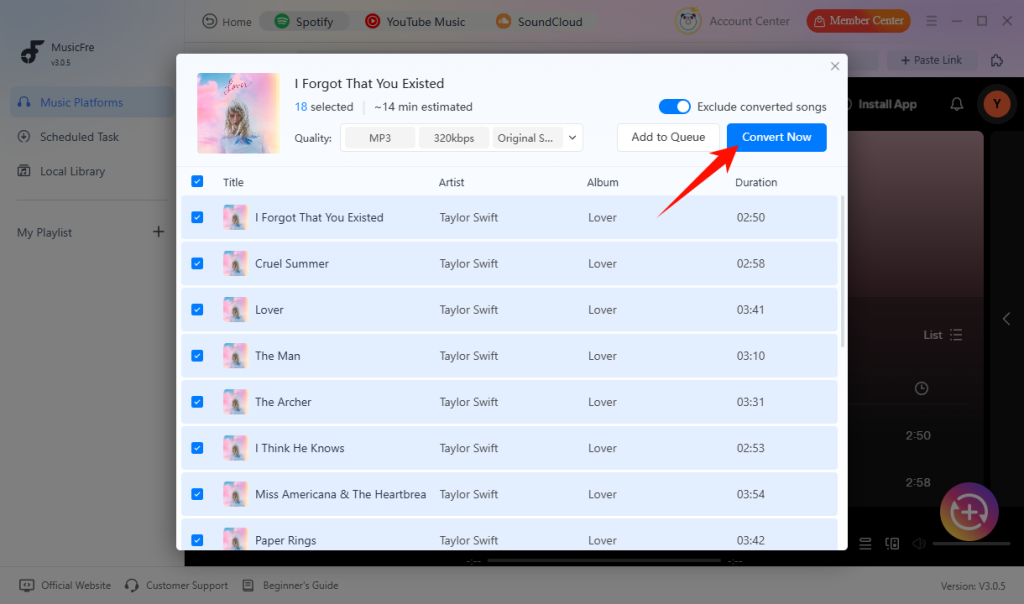
Step 4. Click Convert Now and wait for the process to finish. Your MP3 files will then be ready in the output folder.
After conversion, your MP3 files are ready to play on compatible devices, including computers, smartphones, and portable music players.
Method 4. Check for Direct Downloads of Taylor Swift Songs
Another way to obtain music files is through platforms where creators allow listeners to download their tracks directly.
Some music platforms provide a download button when an artist or rights holder enables the feature. When available, this allows listeners to save the provided audio file without relying on a third-party tool.
However, this method has a key limitation: not every song on a music platform is available for direct download.
How to Download Tracks When the Option Is Available
Step 1. Open the music platform and find the track you want.
Step 2. Check whether the creator has enabled a direct download option.
Step 3. Select the download option if it is available.
Step 4. Save the provided audio file to your device.
Step 5. Check the downloaded file’s extension and audio properties to identify its format.
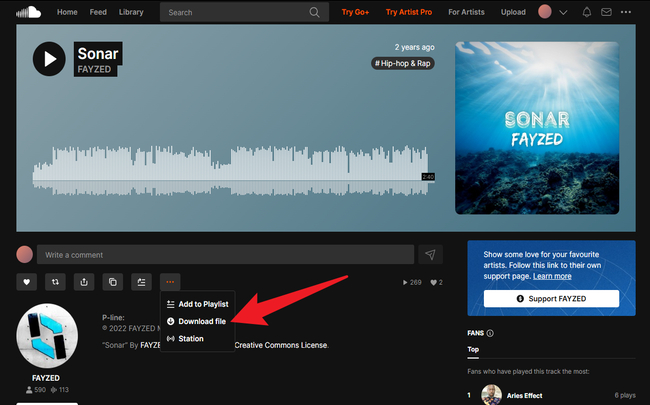
This method is useful when direct downloads are available, but it isn’t a universal solution for finding every Taylor Swift song.
What If the Downloaded File Isn’t MP3?
The original file format depends on what the creator provides. You might receive an MP3, WAV, or another supported audio format.
If you obtain a WAV file and want a smaller file for everyday playback, you can use an audio converter to create an MP3 version, provided you have the necessary rights.
10 Popular Taylor Swift Songs to Add to Your MP3 Collection
Looking for some Taylor Swift songs to add to your personal music library? Here are ten memorable tracks from different stages of her career.
The selection includes country-pop favorites, chart-topping pop hits, and emotional ballads, giving you a good starting point for building your own Taylor Swift music collection.
| Song | Album | Release Year | Genre |
| Love Story | Fearless | 2008 | Country Pop |
| You Belong with Me | Fearless | 2008 | Country Pop |
| Blank Space | 1989 | 2014 | Electropop |
| Shake It Off | 1989 | 2014 | Dance-pop |
| Style | 1989 | 2014 | Synth-pop |
| Delicate | reputation | 2017 | Electropop |
| Cruel Summer | Lover | 2019 | Synth-pop |
| cardigan | folklore | 2020 | Indie Folk |
| Anti-Hero | Midnights | 2022 | Synth-pop |
| Fortnight | The Tortured Poets Department | 2024 | Synth-pop |
FAQs About Taylor Swift Songs Download
1What is the best MP3 quality for Taylor Swift songs?
Choose 320 kbps for high-quality MP3 playback if storage space allows. However, a higher output bitrate cannot improve a low-quality source.
2Can I transfer Taylor Swift MP3 files to a USB drive?
Yes. Copy the standalone MP3 files from your computer to the USB drive, then check that your playback device supports the format. Streaming-app offline downloads cannot be transferred this way.
3How can I keep downloaded songs in the correct album order?
Keep the track-number tags and use file names such as 01 – Song Title.mp3. This helps preserve the correct order on players that sort by either metadata or file name.
Final Thoughts
Choose your download method based on how you want to enjoy your music. Streaming-app downloads are ideal for offline listening within a subscription, while digital purchases provide downloadable files for a personal music collection. MusicFre offers another option for batch-converting albums and playlists into MP3 and other audio formats.
Whether you want to listen on your computer, transfer music to a USB drive, or organize your favorite albums, choosing the right format and download method can make managing your Taylor Swift music collection much easier.