English
 中文 (台灣)
 日本語
 한국어
 Italiano
 Français
 Português
 Español


How to Convert SoundCloud to FLAC: What You Need to Know [2026 Guide]
- Category:SoundCloud Music Tips
- Xiny
- 2026-11-12
Getting a FLAC file from SoundCloud does not necessarily mean getting lossless audio. The format of the downloaded file and the quality of the original recording are two different things. For example, converting a compressed SoundCloud stream to FLAC may result in a larger file, but it cannot restore audio data lost during the original compression.
So, when can you download an original FLAC file from SoundCloud, and what can you do when that option is unavailable? This guide explains what you need to know, covers the official download option, and shows you how to convert SoundCloud tracks to FLAC with MusicFre.
Can SoundCloud Provide True Lossless FLAC Files?
Yes. SoundCloud can provide original FLAC files when creators upload music in this format and enable downloads. However, this does not mean every track on the platform is available as a lossless file.
To understand the difference, it helps to look at how FLAC works and how SoundCloud handles uploaded audio.
What Is a FLAC File?
FLAC stands for Free Lossless Audio Codec. It is an audio format that compresses sound data without permanently removing audio information. Unlike lossy formats such as MP3 and AAC, FLAC allows the original audio data to be reconstructed when the file is decoded.
This makes FLAC useful for:
The important limitation is that FLAC can preserve the quality of its source, but it cannot improve a lossy source. Converting a compressed SoundCloud stream to FLAC does not make it a true lossless recording.
FLAC vs. WAV: What’s the Difference?
FLAC and WAV are both commonly used for high-quality audio, but they handle audio data differently.
WAV is a container format that commonly stores uncompressed PCM audio, while FLAC uses lossless compression to reduce file size without discarding audio information.
| Feature | FLAC | WAV |
| Compression | Lossless compression | Usually uncompressed |
| Audio quality | Preserves source audio data | Preserves source audio data |
| File size | Smaller | Larger |
| Metadata support | Supports metadata tags | Metadata support varies |
| Common uses | Music libraries, archiving, playback | Recording, editing, production |
Choose FLAC when you want to save storage space and maintain an organized music library. WAV may be more convenient for some audio production workflows because many editing applications support it directly.
Neither format can make a low-quality SoundCloud stream lossless. The quality still depends on the original audio source.
Why Choose FLAC for SoundCloud Music?
There are several reasons to save SoundCloud tracks in FLAC:
- FLAC preserves all audio data when encoded from a genuine lossless source.
- FLAC files are generally smaller than uncompressed WAV files while retaining the same decoded audio quality.
- FLAC supports metadata such as artist, title, album, and cover art, helping organize a local music library.
- FLAC can be decoded without quality loss, making it suitable for audio editing and conversion.
When Can You Download Original FLAC Files from SoundCloud?
You can download an original FLAC file directly from SoundCloud when the creator has uploaded a FLAC file and enabled the download option.
SoundCloud allows creators to control whether individual tracks can be downloaded. When downloads are enabled, listeners can obtain a copy of the original uploaded file rather than the compressed version used for streaming.
However, there are a few limitations:
- Not every SoundCloud track has a download option.
- The available download format depends on the creator’s original upload.
- SoundCloud’s official download feature supports individual tracks, not entire playlists.
Therefore, before looking for a third-party SoundCloud FLAC downloader, check whether the original track is available for direct download.
How to Download FLAC from SoundCloud Directly
SoundCloud’s official download option is the most reliable way to get the original audio file when available.
Here’s how to download the original file:
Step 1. Visit the SoundCloud website and log in to your account.
Step 2. Browse or use the search bar to find the track you want to download.
Step 3. On the track page, look below the waveform or track controls for Download file.
Step 4. Click the download option to save the file to your computer.
Step 5. Once the download is complete, check the file extension to identify its format.
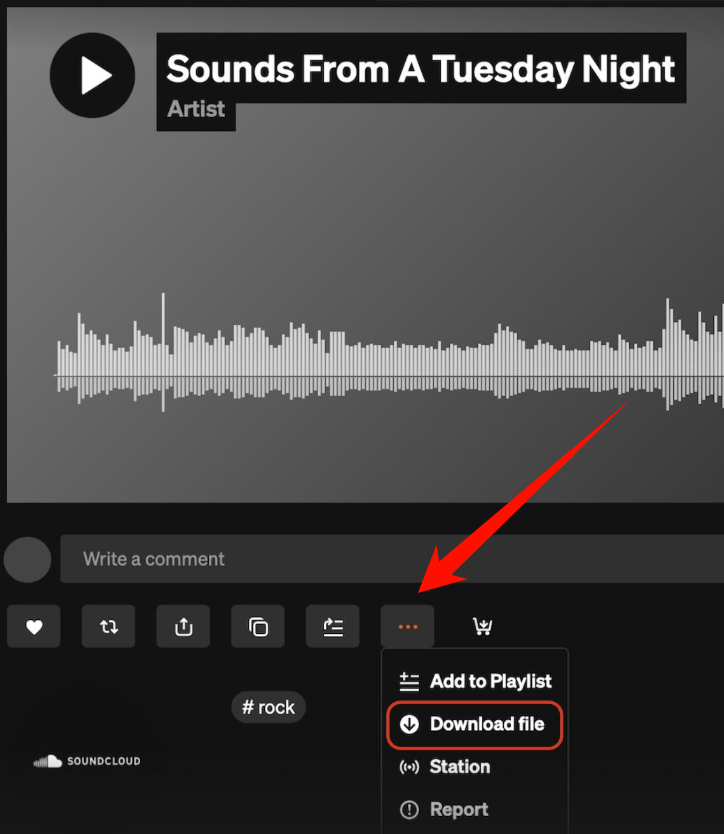
Keep in mind that the downloaded file may be WAV, FLAC, MP3, or another format, depending on what the creator originally uploaded.
If you cannot find a download button, the creator has not made that track available for direct downloading. In that case, you may need an alternative method to save individual tracks or process multiple songs.
Alternative: Save SoundCloud Music as FLAC with MusicFre
If a SoundCloud track does not have an official download option, using a SoundCloud to FLAC downloader is worth considering. MusicFre is a desktop music converter for Windows and Mac that supports SoundCloud conversion. It allows you to browse SoundCloud music, select tracks, albums, or playlists, and convert them into common audio formats, including FLAC, MP3, and WAV.
Unlike SoundCloud’s built-in download feature, MusicFre supports batch conversion, making it useful when you want to save multiple tracks at once. You can also choose the output format and manage your converted files locally.
Here are some features worth noting:
How to Convert SoundCloud to FLAC with MusicFre
MusicFre provides a built-in SoundCloud music interface, allowing you to find tracks and add them directly to the conversion queue.
Follow these steps to save SoundCloud music as FLAC:
Step 1. Install and Launch MusicFre
Download MusicFre from the official website and install the version for your operating system. Launch the application after installation.






Step 2. Set FLAC as the Output Format
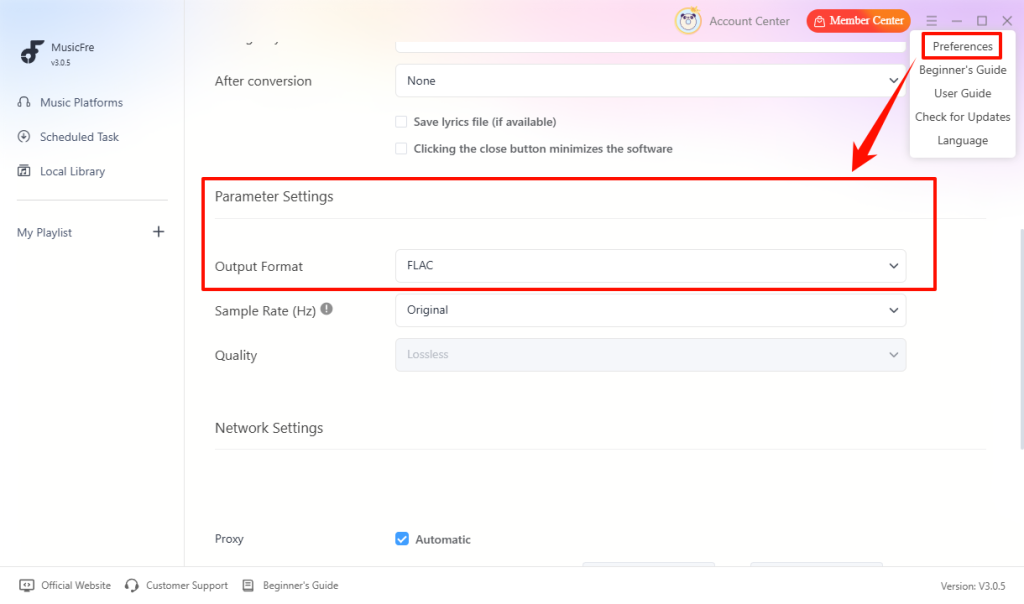
Open Preferences, navigate to Parameter Settings, and choose FLAC under Output Format.
Step 3. Add a SoundCloud Track or Playlist
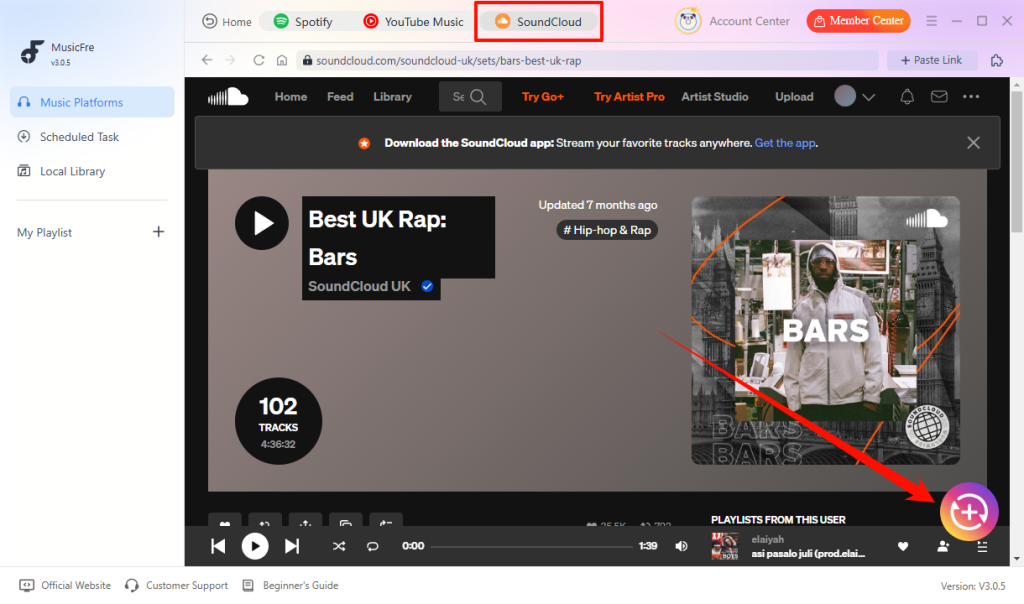
Select SoundCloud from the Music Streaming screen. Find the track, album, or playlist you want and click the + button to add it to the queue.
Step 4. Convert SoundCloud Music to FLAC
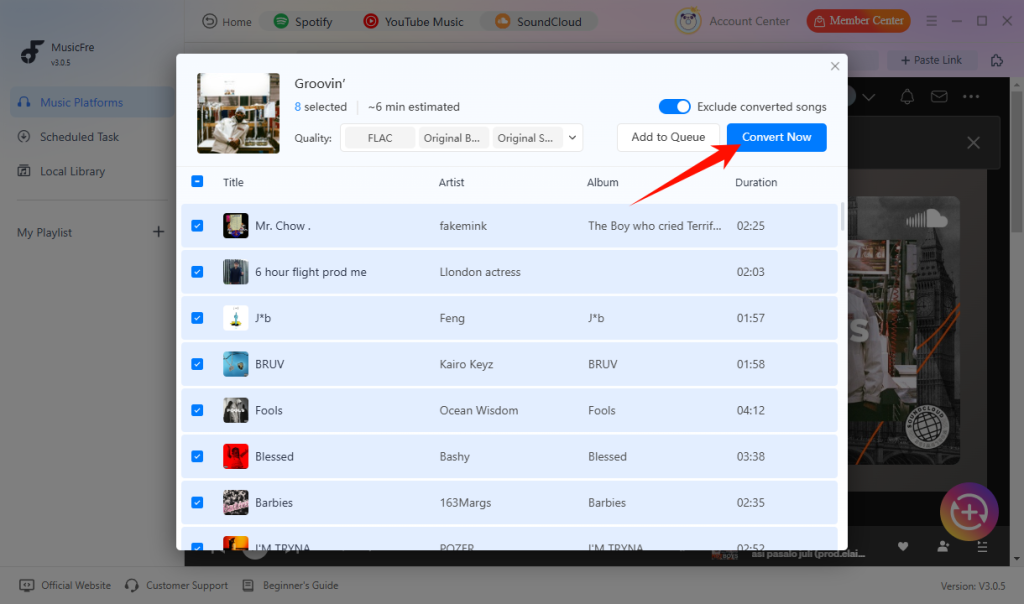
Review your selected tracks and click Convert Now to start the conversion. Wait for the process to finish.
Step 5. Locate Your FLAC Files
Once the conversion is complete, click Open Folder to find your converted FLAC files.
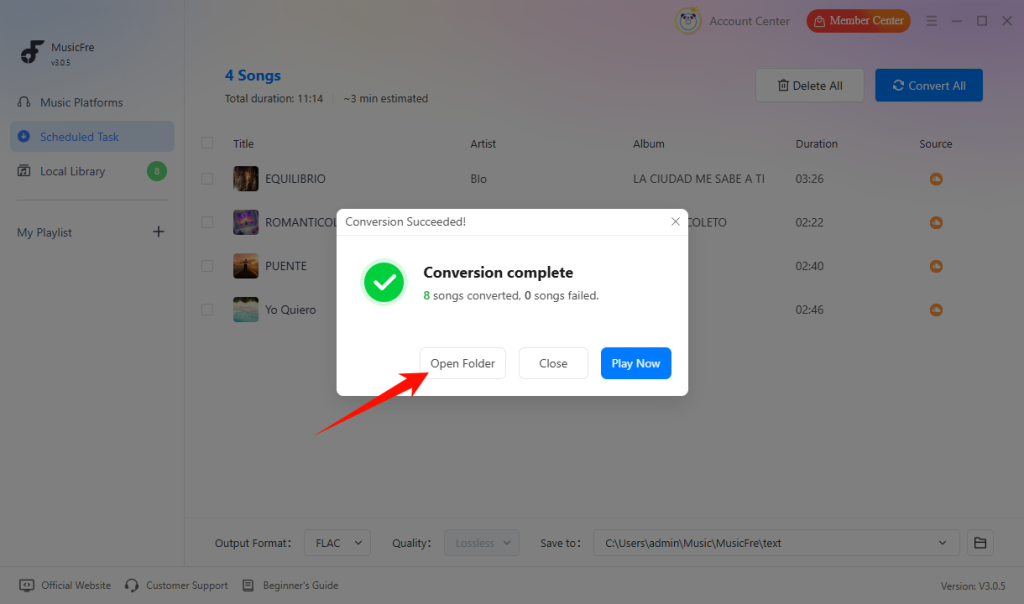
Your converted music will be saved in the output folder you selected. You can then organize the files in your local music library or transfer them to compatible devices.
SoundCloud to FLAC Troubleshooting
If you encounter problems when downloading or converting SoundCloud music to FLAC, check the following common issues and their possible solutions.
1.The FLAC File Is Too Large
FLAC files are generally smaller than uncompressed WAV files, but they can still take up considerable storage space, especially when saving entire albums or playlists.
Solution: Check how much free storage space is available before starting a batch conversion. If storage is limited, consider using MP3 for everyday listening and reserve FLAC for music you want to archive.
2.The Converted FLAC File Cannot Be Played
Some media players and portable devices do not support FLAC playback. In other cases, an outdated player or missing codec may cause playback problems.
Solution: Try opening the file with a media player that supports FLAC, such as VLC. If your device does not support this format, convert the file to a compatible format such as MP3 or AAC.
3.The Converted FLAC Files Are Missing Track Information
After conversion, some FLAC files may not display the correct song title, artist, album, or cover art in your music player.
Solution: Check the file’s metadata using an audio tag editor and add any missing information manually. You can also check whether your converter supports ID3 or other relevant metadata preservation features.
FAQs About SoundCloud to FLAC
1How can I check whether a FLAC file is truly lossless?
You can use an audio information tool such as MediaInfo to check the file’s codec, sample rate, and bit depth. However, file specifications alone cannot confirm whether the original source was lossless.
2Does a higher sample rate mean better FLAC audio quality?
Not necessarily. Audio quality depends on the original recording. Increasing the sample rate cannot restore audio information that has already been lost.
3Can I edit the metadata of SoundCloud FLAC files?
Yes. You can use an audio tag editor to modify information such as the track title, artist, album, track number, and cover art.
In Conclusion
Downloading SoundCloud music as FLAC depends on the original audio source and the available download options. If a creator enables downloads and provides a lossless file, SoundCloud’s official download feature is the best way to obtain that original audio.
When direct downloads are unavailable, or you need more flexibility in output formats and batch processing, a desktop converter such as MusicFre offers another option for saving SoundCloud tracks as FLAC.
Most importantly, remember that a FLAC extension does not guarantee a lossless source. Start with the highest-quality audio available, choose the right output format, and avoid unnecessary conversions to get the best results from your SoundCloud music collection.