English
 中文 (台灣)
 日本語
 한국어
 Italiano
 Français
 Português
 Español


How to Listen to SoundCloud Offline With or Without Go/Go+
- Category:SoundCloud Music Tips
- Xiny
- 2026-11-18
Finding a song you love is one thing. Being able to listen to it whenever you want is another. You might want to replay a favorite track without relying on an internet connection or worrying about whether it will still be available on the platform.
However, SoundCloud’s offline listening feature comes with a catch: it’s primarily available to Go and Go+ subscribers. Does that mean you have to pay a monthly subscription to enjoy your favorite tracks offline? Not necessarily. Depending on the track and how you want to save it, there are other ways to keep your favorite SoundCloud music available for offline playback.
In this guide, we’ll explore the official options and show you how to listen to SoundCloud offline with or without a subscription.
Can You Listen to SoundCloud Offline?
Yes. You can listen to SoundCloud offline in several ways, depending on your subscription and how you want to access your music.
Here are the main options:
- SoundCloud Go or Go+: Save eligible tracks, playlists, and your Library for offline playback within the SoundCloud mobile app. A paid subscription is required.
- Official Track Downloads: Download individual tracks directly from SoundCloud when creators enable the download option. The files can then be played offline using compatible music players.
- MusicFre: Save SoundCloud tracks, albums, and playlists as local audio files in formats such as MP3, FLAC, and WAV for offline playback on compatible devices.
The main difference is how your music is stored. SoundCloud Go and Go+ keep offline content inside the app, while downloaded audio files can be stored locally and played outside SoundCloud. Let’s look at each method in detail.
How to Listen to SoundCloud Offline with Go or Go+
SoundCloud Go and Go+ are the platform’s official subscription plans for listeners who want additional features, including offline playback and ad-free listening.
With either plan, you can save eligible music to your mobile device and listen without Wi-Fi or mobile data. However, the two subscriptions offer different levels of access to SoundCloud’s music catalog and audio-quality options.
SoundCloud Go vs. Go+: Which Plan Do You Need?
Both SoundCloud Go and Go+ support offline listening, but they are not exactly the same.
Here’s a quick comparison:
| Feature | SoundCloud Go | SoundCloud Go+ |
| Offline listening | ✅ | ✅ |
| Ad-free listening | ✅ | ✅ |
| Music catalog | Limited catalog | Full catalog |
| High-quality audio | Standard listening experience | High-quality audio options |
SoundCloud Go is designed for casual listeners who want an ad-free experience and the ability to save music for offline playback. It provides access to millions of tracks, including music from independent artists.
SoundCloud Go+ offers a more extensive listening experience, with access to SoundCloud’s expanded catalog, including major-label releases and additional high-quality audio options. It’s a better fit for listeners who want broader music access.
Both subscriptions support offline listening, but this feature is only available through the mobile app. Availability and specific features may vary by country and subscription plan. You can check the latest details on SoundCloud’s official subscription page.
How to Download SoundCloud Music for Offline Listening
If you already have a SoundCloud Go or Go+ subscription, saving music for offline playback is straightforward.
Step 1. Open the SoundCloud app on your phone and sign in to your account.
Step 2. Go to Library and open the playlist or Likes collection you want to save.
Step 3. Tap the download arrow next to the playlist or Likes section.
Step 4. Wait for the download to finish. You can check the progress in the app.
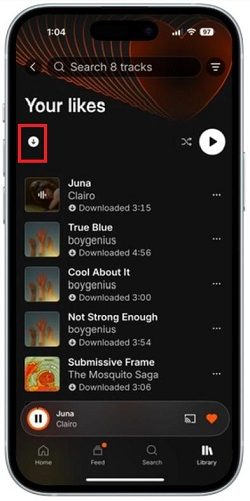
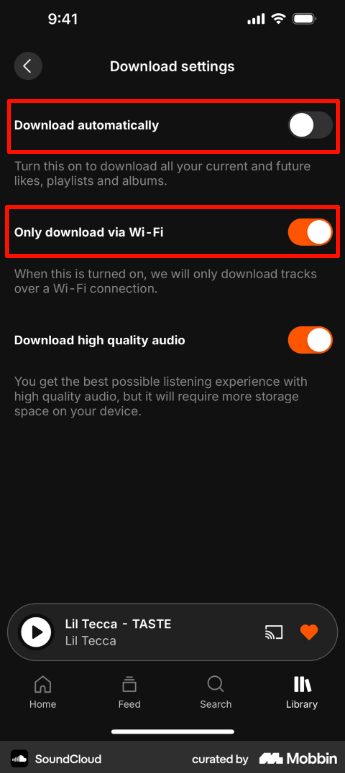
You can also enable automatic downloads to keep your Library available offline. Go to Settings, open Downloads, and turn on Download automatically.
If you want to reduce mobile data usage, enable Only download via Wi-Fi so your music is saved when your device is connected to a wireless network.
Limitations of SoundCloud’s Offline Feature
Although SoundCloud Go and Go+ make offline listening convenient, there are a few limitations worth knowing before subscribing.
1Offline music stays within the SoundCloud app.
Tracks saved through Go or Go+ are stored as app-managed offline content. You can’t directly export these downloads as MP3 or WAV files.
2You need an eligible subscription.
Offline listening through the official app requires SoundCloud Go or Go+. A regular free account doesn’t include this subscription-based feature.
3Not every track is available offline.
Music availability depends on the rights holders. Some tracks may be excluded from offline listening even if you have a Go or Go+ subscription.
4Offline downloads can disappear from your device.
SoundCloud temporarily stores offline content in its mobile app. If you sign out or uninstall the app, your saved tracks and playlists will be removed. You’ll need to download them again after signing back in or reinstalling.
These limitations may not matter if you only listen to music through SoundCloud. However, if you want more control over where and how you play your music, saving local audio files may be a better fit.
How to Listen to SoundCloud Offline Without a Subscription
If you don’t want to pay for a recurring SoundCloud subscription, there are other ways to access music offline.
You can download individual tracks when creators enable the official download feature, or use a desktop music converter such as MusicFre to save eligible SoundCloud music as local audio files.
Method 1:Download Tracks Directly from SoundCloud
SoundCloud allows creators to decide whether listeners can download their uploaded tracks. When a creator enables this feature, you’ll see a Download file button beneath the track’s waveform on the website.
This is the most direct way to obtain an original audio file without subscribing to SoundCloud Go or Go+.
Step 1. Open SoundCloud in your desktop web browser and sign in.
Step 2. Search for the track you want to save and open its page.
Step 3. Look below the waveform or track controls for the Download file button.
Step 4. Click the button and wait for the download to finish.
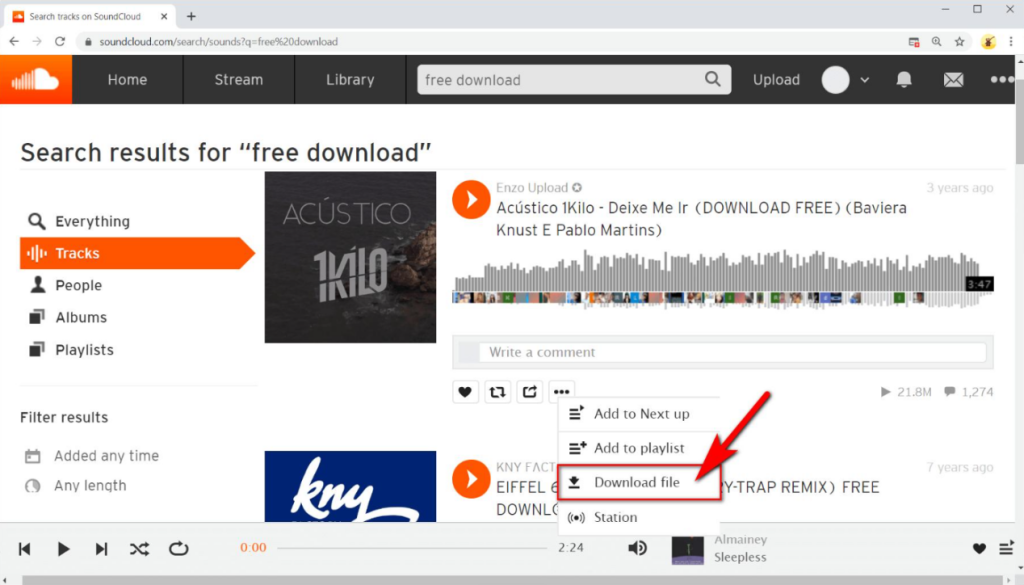
The downloaded format depends on the creator’s original upload. It could be MP3, WAV, or another audio format.
This option only works for individual tracks with downloads enabled, so you can’t download an entire playlist at once. If the button is missing, that track is not available for direct download.
Method 2:Use MusicFre to Save SoundCloud Music Locally
What if you want to save more than a few individual tracks? Or perhaps you prefer having your music in MP3, FLAC, or WAV format so you can play it on different devices?
In that case, MusicFre offers a more flexible solution. It gives you more control over your music by letting you save eligible SoundCloud tracks, albums, and playlists as local files for playback across compatible devices.
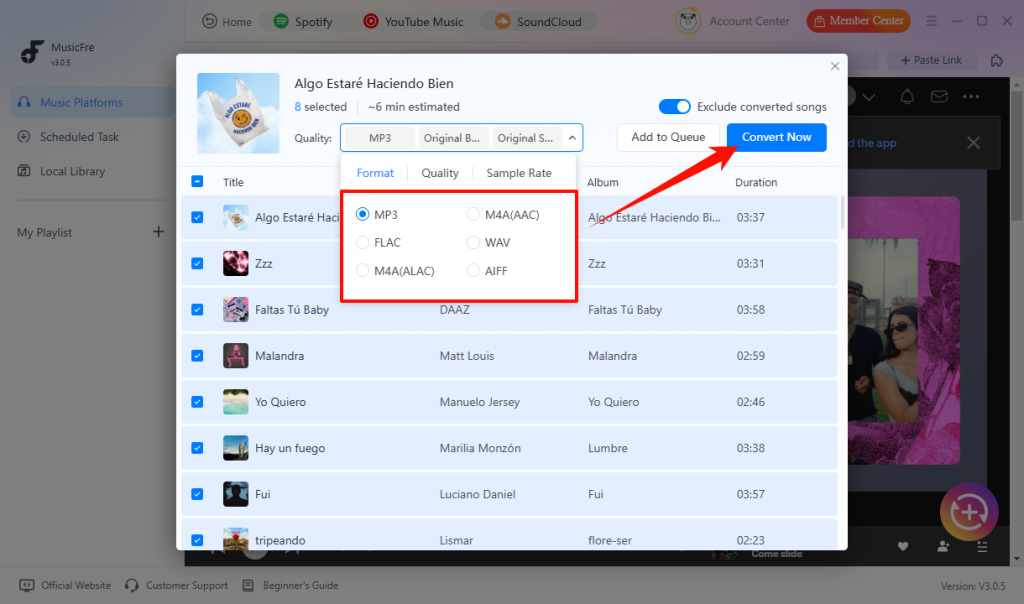
You can choose from multiple output formats, including MP3, FLAC, WAV, AAC, M4A, and AIFF, and adjust audio settings such as bitrate and sample rate to suit your preferences.
If you have a large music collection, batch conversion lets you add multiple tracks or entire supported playlists to the queue instead of processing them one by one.
Best of all, you don’t need a SoundCloud Go or Go+ subscription to use MusicFre. If you want to avoid recurring subscription fees and the device restrictions of SoundCloud’s built-in offline mode, saving music as local files gives you greater flexibility over how and where you listen.






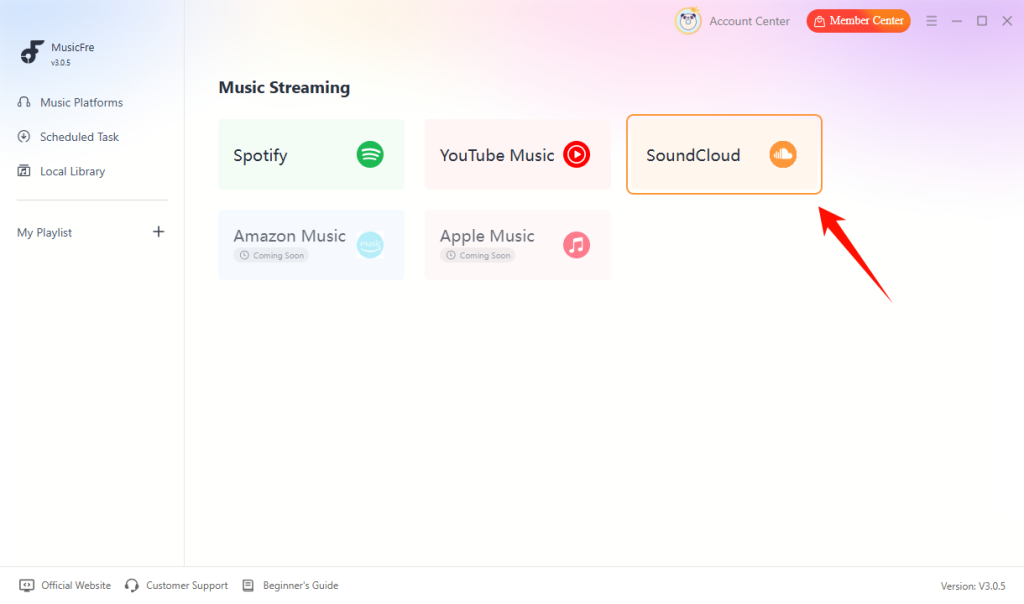
Step 1. Launch MusicFre and select SoundCloud on the Music Streaming screen.
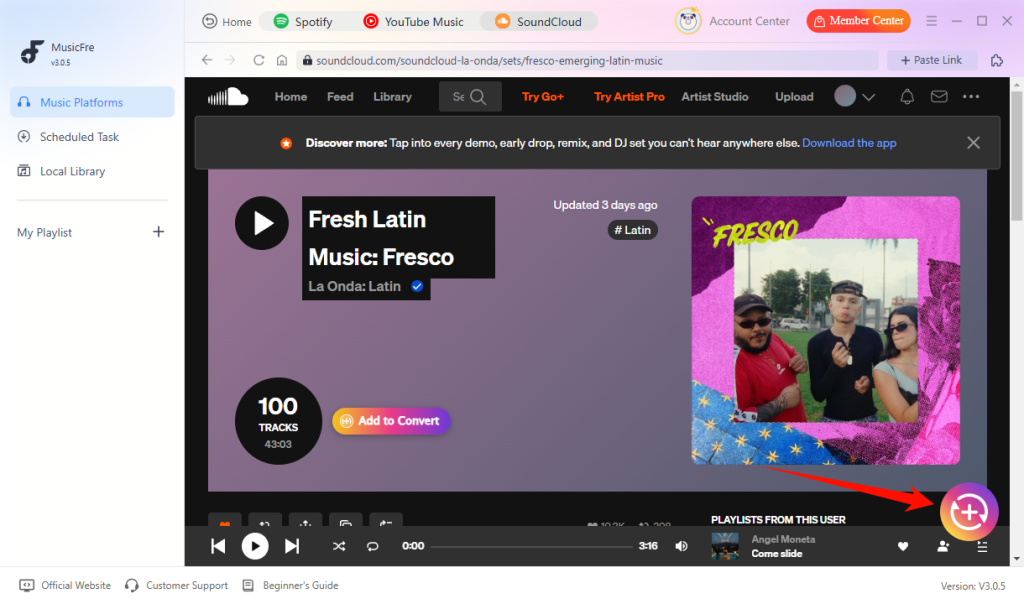
Step 2. Browse SoundCloud for the track, album, or playlist you want, then click the + button to add it to the queue.
Step 3. Select an output format that works with your music player, then click Convert Now to start processing.
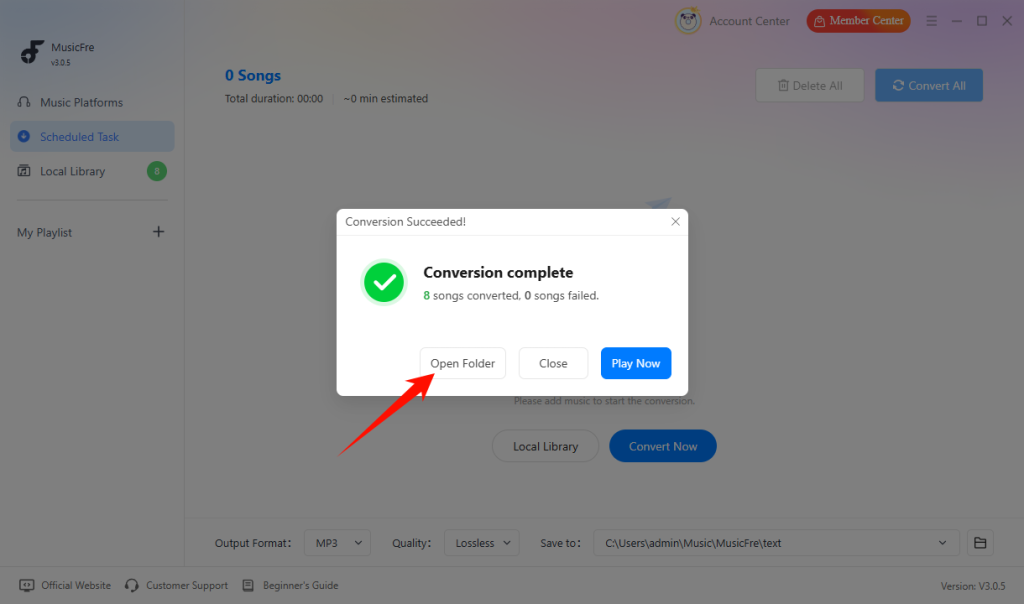
Step 4. Once the task is complete, click Open Folder to find your converted audio files.
Important: Only save tracks that you own or have permission to download and use. MusicFre doesn’t grant additional rights to copyrighted content or override restrictions set by rights holders.
SoundCloud Offline Listening vs. Downloaded Music Files
At this point, you might be wondering whether SoundCloud’s built-in offline mode or local audio downloads are better.
Both methods let you enjoy music without an internet connection, but they cater to different listening habits.
| Comparison | SoundCloud In-App Downloads | Local Audio Files |
| Where can you play the music? | Through the SoundCloud app | Through compatible audio players |
| Can you transfer music to another device? | No, not as regular audio files | Yes, if the file and device are compatible |
| Can you choose the audio format? | No | Depends on the download method; yes with MusicFre |
| Do you need a Go or Go+ subscription? | Yes | No SoundCloud subscription required |
| How is your music organized? | Through your SoundCloud Library | Through folders and your music player’s library |
FAQs About SoundCloud Offline Listening
1Can I download SoundCloud playlists for offline listening?
Yes. SoundCloud Go and Go+ subscribers can save eligible playlists for offline listening through the mobile app. If you want regular audio files, you can also use MusicFre to save playlists locally.
2What happens to offline downloads after canceling SoundCloud Go or Go+?
Once your subscription expires, you lose access to subscription-based offline listening. Your saved tracks will no longer be available for offline playback through SoundCloud.
3Can I listen to SoundCloud in airplane mode?
Yes, provided you download your music before the flight. You can play saved tracks inside the SoundCloud app with an active Go or Go+ subscription, or listen to local audio files through a compatible music player.
Conclusion
Listening to SoundCloud offline does not have to mean paying for a monthly subscription. SoundCloud Go and Go+ offer convenient offline playback through the mobile app, while the official download feature lets you save individual tracks when creators allow it.
If you want more flexibility, MusicFre provides an alternative with customizable output formats, batch conversion, and the freedom to play your music across compatible devices.
Now that you know your options, you can decide how you want to save and enjoy your SoundCloud music offline.