English
 中文 (台灣)
 日本語
 한국어
 Italiano
 Français
 Português
 Español


How to Download SoundCloud to M4A: Desktop & Online Methods
- Category:SoundCloud Music Tips
- Xiny
- 2026-11-18
Downloading a track from SoundCloud does not always give you the audio format you want. Even when a creator enables downloads, the saved file comes in its original uploaded format, which could be MP3, WAV, or something else. If you’re building a music library or want to keep your tracks in M4A format, this can be a little inconvenient.
The good news is that you don’t have to stick with the original file format. With the right tool, you can convert SoundCloud tracks to M4A and organize your music for playback on your computer or Apple devices. Below, we’ll look at two ways to do it, explain the differences between AAC and ALAC, and show you how to transfer your M4A files to an iPhone or Mac.
Understanding M4A and SoundCloud Downloads
Before choosing a SoundCloud to M4A converter, it’s helpful to understand how M4A works and what SoundCloud actually provides when you download or stream a track. These details can help you choose the right output settings and avoid unnecessary quality loss.
What Is M4A and How Does It Work?
M4A stands for MPEG-4 Audio. It is an audio container format commonly used to store music encoded with AAC (Advanced Audio Coding) or ALAC (Apple Lossless Audio Codec).
Unlike MP3, which is both a file format and an audio encoding format, M4A can contain audio encoded using different codecs. This means two files with an .m4a extension may have different compression methods and audio characteristics.
Therefore, choosing M4A does not automatically mean choosing lossless audio. The actual quality depends on the codec, bitrate, and original audio source.
AAC vs. ALAC: What’s the Difference?
Although both AAC and ALAC can be stored in M4A containers, they serve different purposes.
| Feature | AAC | ALAC |
| Compression | Lossy | Lossless |
| Audio data | Some audio information is discarded | Original audio data can be fully reconstructed |
| File size | Smaller | Larger |
| Storage efficiency | High | Lower than AAC |
| Common extension | .m4a | .m4a |
For everyday listening, AAC is generally sufficient and offers a good balance between sound quality and file size. If you prefer lossless audio storage and have a high-quality source file, ALAC is a better choice.
However, converting an already compressed SoundCloud stream into ALAC won’t restore the audio information lost during the original encoding. The output will be a losslessly encoded version of the available source, not a newly restored original recording.
Can You Download SoundCloud Playlists Directly?
SoundCloud allows creators to make individual tracks available for download, but the official feature has some limitations.
When a creator enables downloads, you can save the original uploaded audio file to your computer. The available format depends on the original upload, so you might get an MP3, WAV, FLAC, or another format instead of M4A.
SoundCloud Go and Go+ offer another way to access playlists offline. Subscribers can save eligible tracks and playlists for offline playback within the mobile app. However, these offline saves remain within SoundCloud and cannot be exported as independent M4A files.
If you want to convert SoundCloud songs into M4A files or handle multiple tracks from a playlist, you’ll need a tool that supports M4A output and batch conversion.
Why Save SoundCloud Music in M4A Format?
MP3 is widely supported, so why do some users specifically prefer M4A when saving music from SoundCloud? It mainly comes down to audio quality, storage efficiency, and device compatibility.
Efficient audio compression for everyday listening. M4A supports AAC encoding, which generally delivers better perceived audio quality than MP3 at similar bitrates. SoundCloud also offers 256 kbps AAC streaming under certain account and track conditions. Saving an available AAC stream in an M4A container without re-encoding can preserve the existing audio quality.
Better organization for music library. M4A supports metadata such as track titles, artist names, album information, and cover art. When this information is preserved during conversion, it makes your local music library easier to browse, organize, and manage.
Convenient playback on Apple devices. M4A is widely supported across Apple’s ecosystem. You can play compatible files on iPhone and iPad, import them into the Music app on Mac, and manage them through iTunes on supported Windows systems.
Best SoundCloud to M4A Downloader: 2 Methods Compared
If SoundCloud’s official download option doesn’t provide the format you need, there are other ways to save audio as M4A.
Method 1.MusicFre SoundCloud Music Converter for Batch Downloads
If you regularly save SoundCloud tracks or want to convert entire playlists, a desktop tool can provide a more organized workflow.
MusicFre is a desktop music converter with an integrated SoundCloud interface. It allows you to download supported SoundCloud content in various formats, including M4A, MP3, FLAC, and more.
Instead of processing tracks individually through a browser, you can add multiple songs or playlists to a conversion queue and manage them together.
The following steps show you how to convert SoundCloud to M4A with MusicFre:
Step 1. Download the Windows or Mac version from the official MusicFre website, then install and launch the program.






Step 2. Choose SoundCloud from the Music Streaming Platforms and sign in to your account in the built-in workspace.
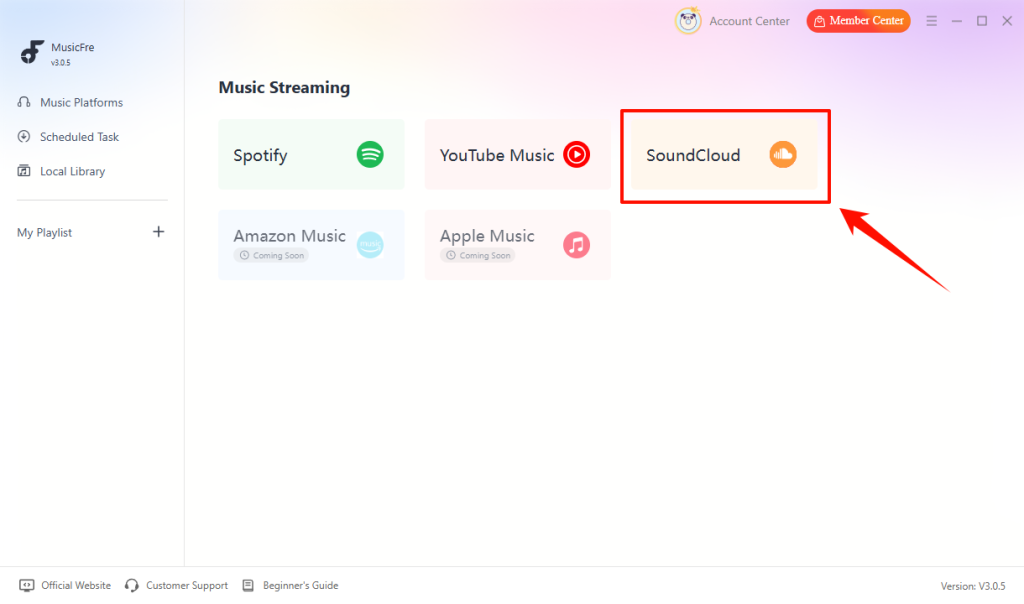
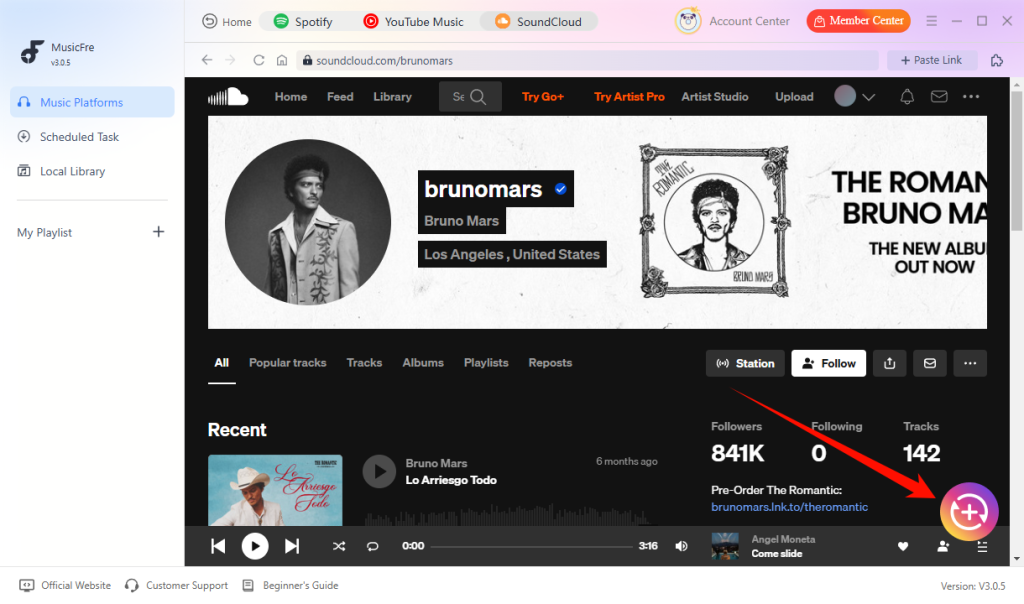
Step 3. Search for the tracks or playlists you want to download, then click the + button to add them to the conversion list.
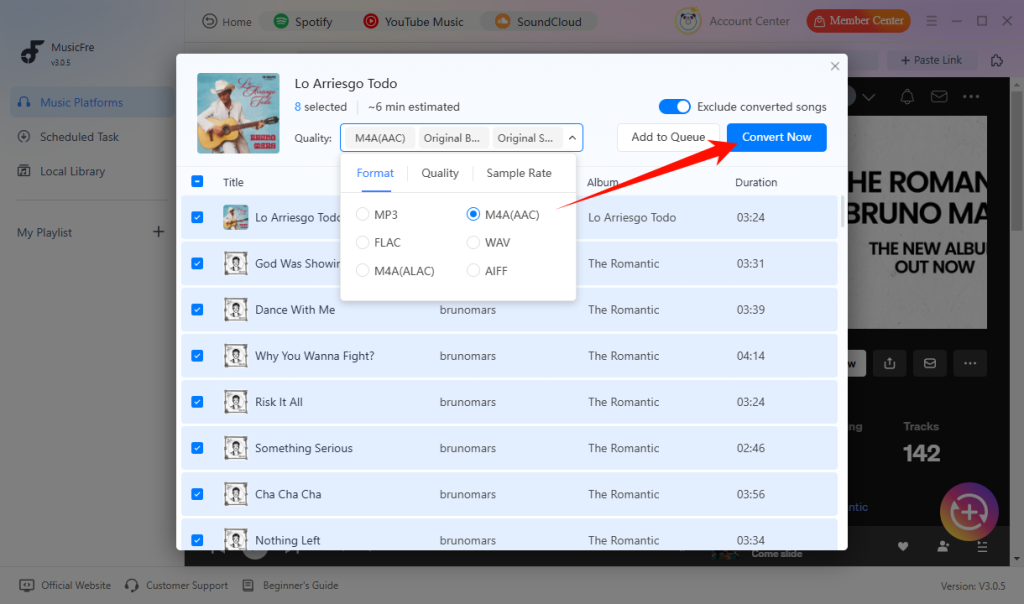
Step 4. Select M4A in the output format options, then hit Convert Now to process the selected songs.
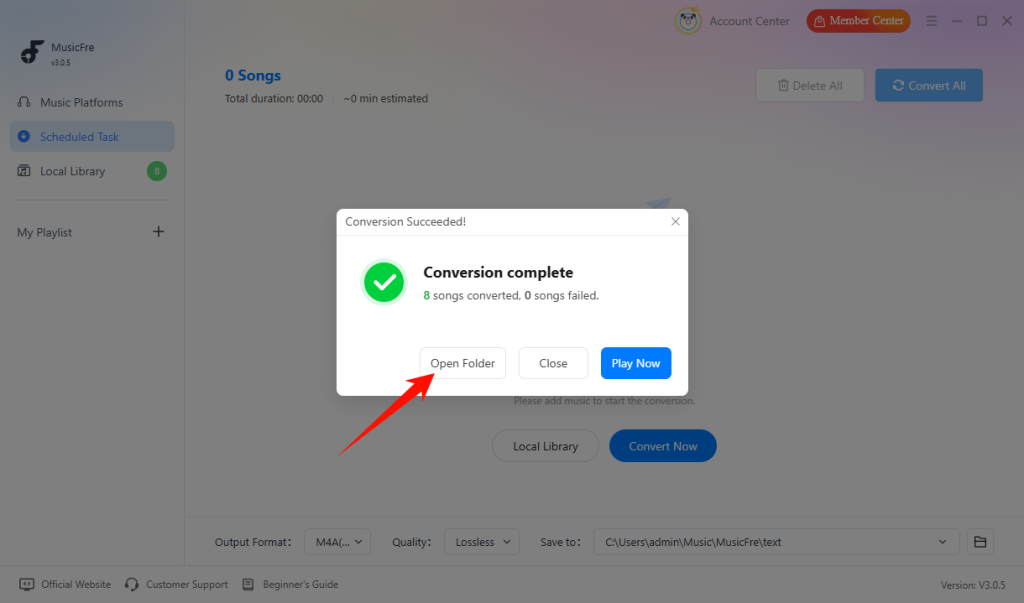
Step 5. Once the Conversion Succeeded notification appears, open the output folder to find your local M4A files.
Method 2.Online SoundCloud to M4A Converter for Single-Track Downloads
If you only need to save an occasional SoundCloud song, an online SoundCloud M4A downloader may be a convenient alternative.
Unlike desktop software, online converters generally work through a web browser. You don’t need to install an additional application, and most tools follow a straightforward link-based process.
Although the exact interface varies between websites, the general process usually looks like this:
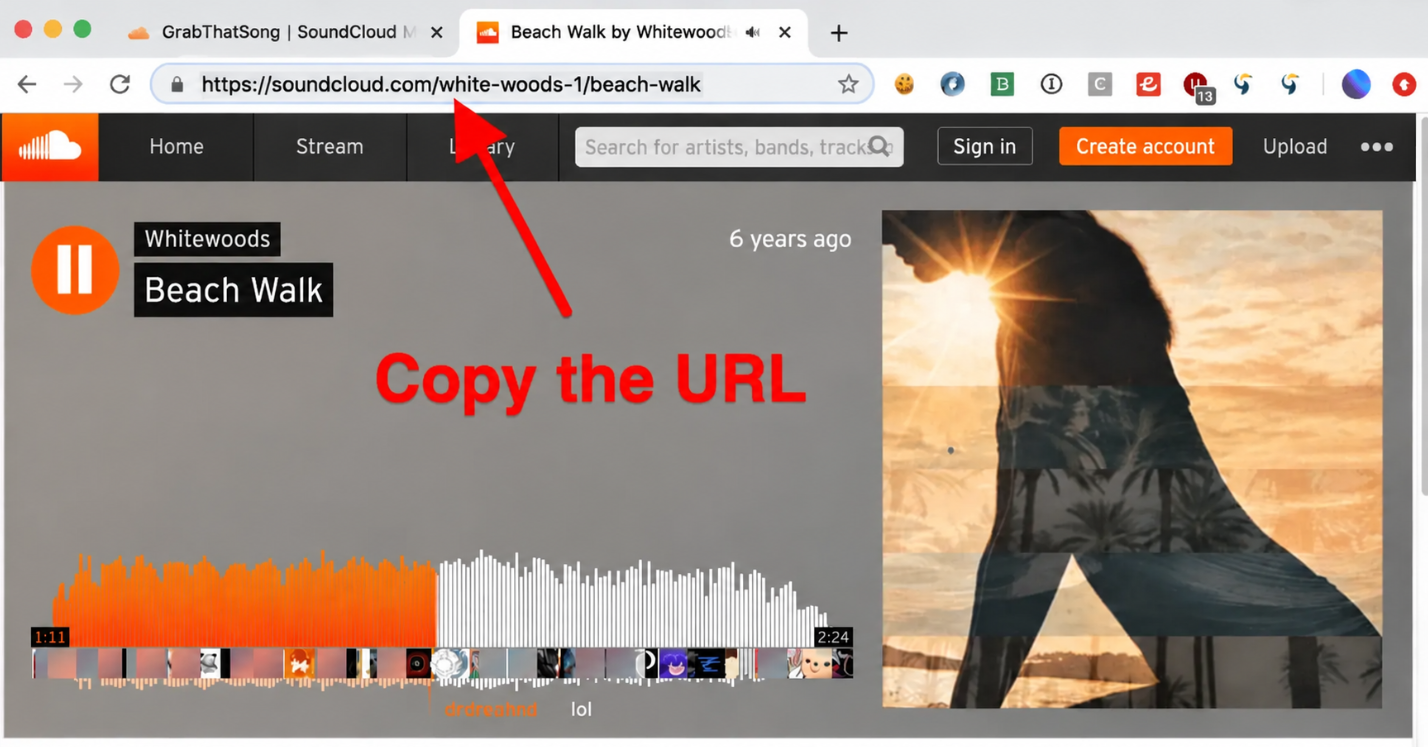
Step 1. Open SoundCloud, find the track you want to save, and copy its URL from the address bar or Share option.
Step 2. Visit an online SoundCloud converter that supports M4A output.
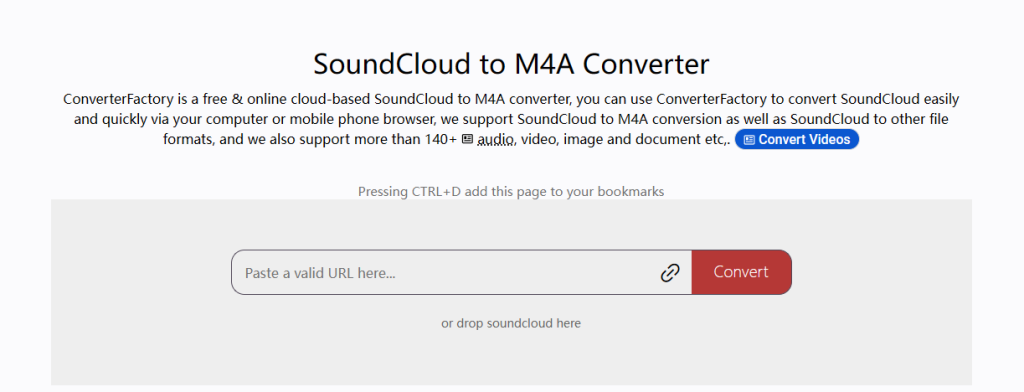
Step 3. Paste the copied URL into the input field and select M4A as the output format.
Step 4. Click the Download or Convert button to process the track and save the resulting M4A file to your device.
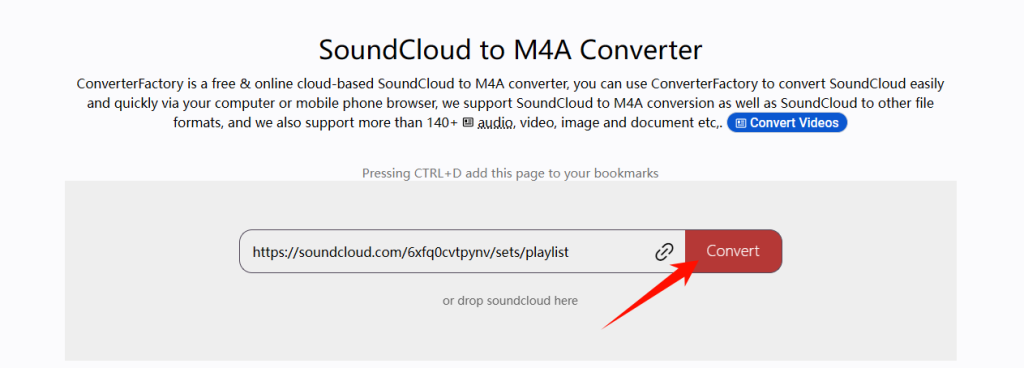
Online tools can be useful for simple tasks, but they aren’t always the best choice for larger music collections.
Here are a few limitations to consider:
- Limited Playlist Support: Some websites only process individual track links, so you may need to repeat the process for multiple songs.
- Uncertain Output Quality: The available audio quality and output settings depend on the service. An M4A extension alone doesn’t guarantee a particular codec or bitrate.
- Ads and Redirects: Some free download websites display advertisements, pop-ups, or misleading download buttons.
- Less Control Over Conversion: You may not be able to adjust audio parameters, organize conversion queues, or manage large batches of files.
How to Transfer and Play M4A Files on Your iPhone or Mac
Once you’ve downloaded SoundCloud music in M4A format, the next step is getting the files onto your devices.
Here are three practical ways to transfer and play your M4A files across iPhone, iPad, and Mac.
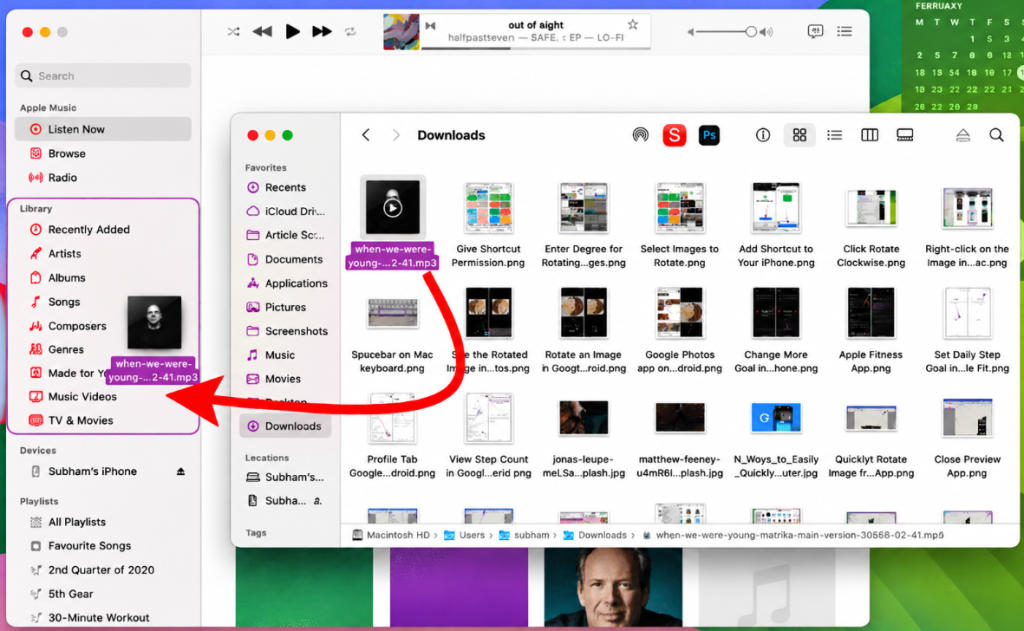
Import M4A Files into the Apple Music App on Mac
The Music app on macOS allows you to add audio files from your computer to your local music library.
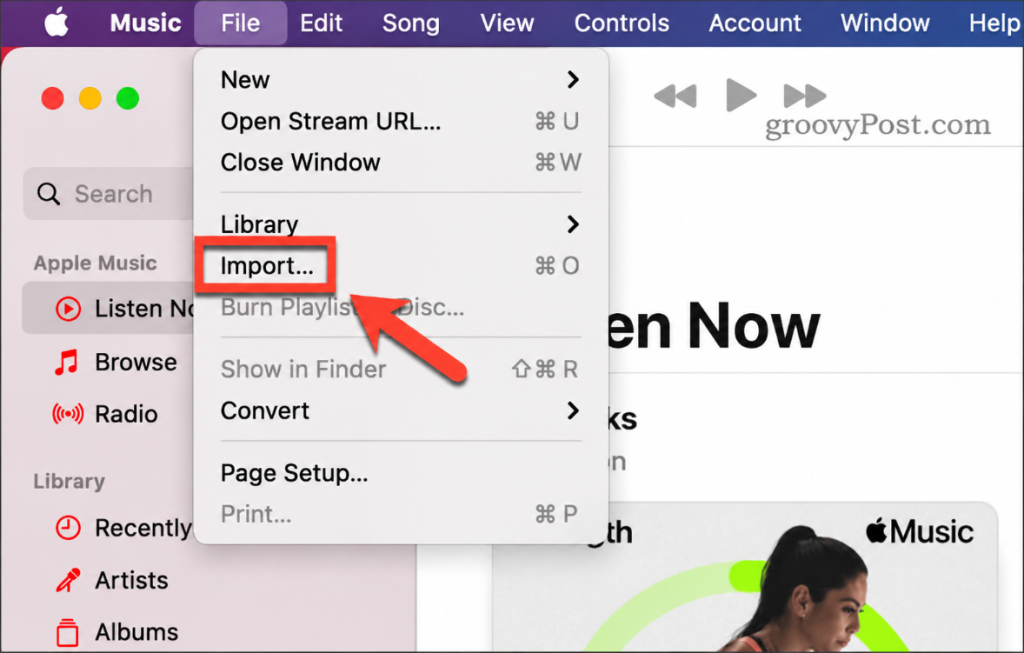
Step 1. Open the Music app on your Mac and click File in the menu bar.
Step 2. Choose Import and browse to the folder containing M4A files.
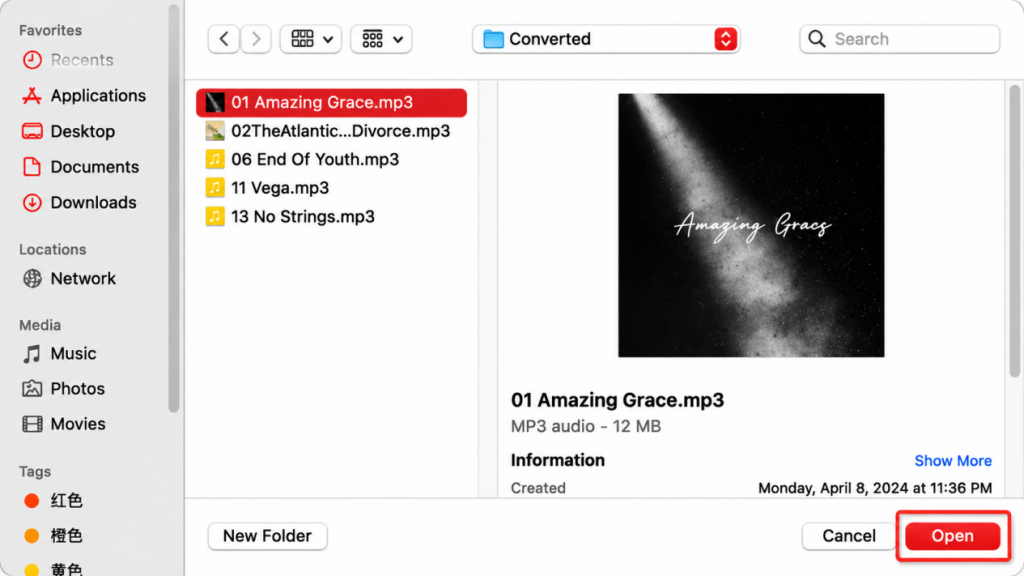
Step 3. Select the M4A files you want to add and click Open.
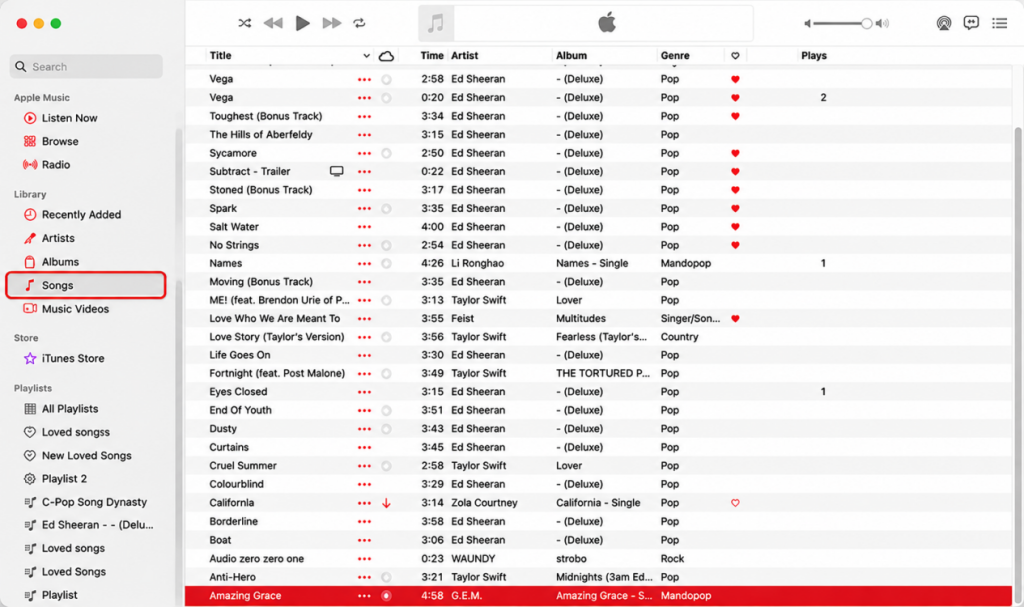
Step 4. Open Recently Added or Songs to find and play the imported tracks.
You can also drag M4A files or folders directly from Finder into the Music app.
Transfer M4A Music from Mac to iPhone
After importing your M4A music into your Mac, you can transfer individual files or sync your music collection to your iPhone.
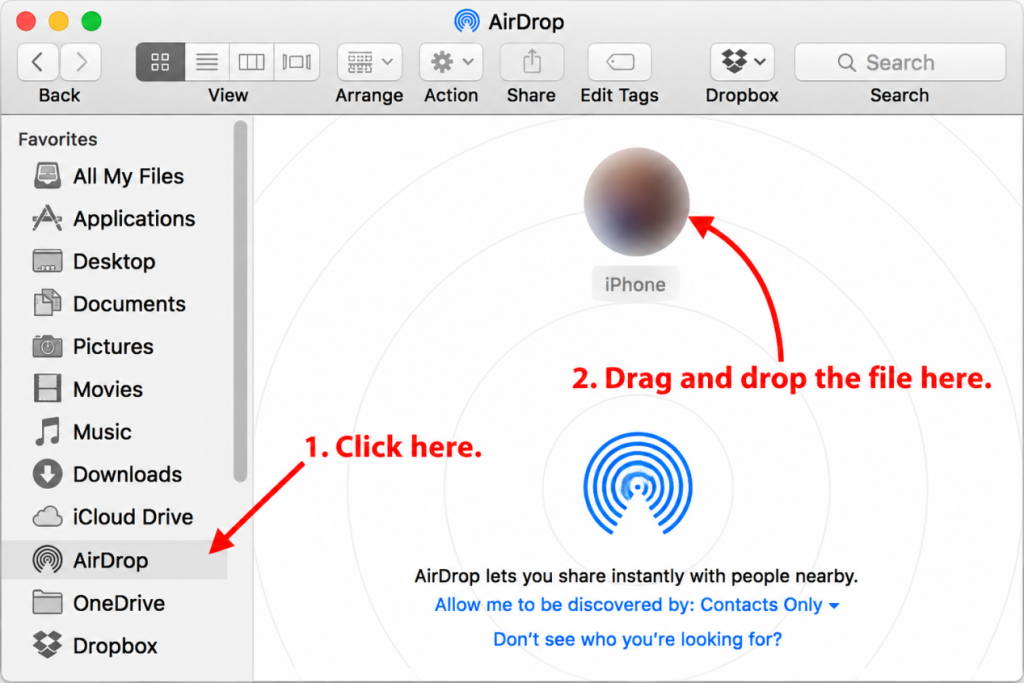
Option 1. Use AirDrop
AirDrop is suitable when you only need to transfer a few M4A files.
Step 1. Turn on Wi-Fi and Bluetooth on both your Mac and iPhone.
Step 2. Open Finder on your Mac and select AirDrop.
Step 3. Find the M4A file you want to send.
Step 4. Drag the file onto your iPhone’s name in the AirDrop window.
Step 5. Accept the transfer on your iPhone if prompted.
Option 2. Sync Music Through Finder
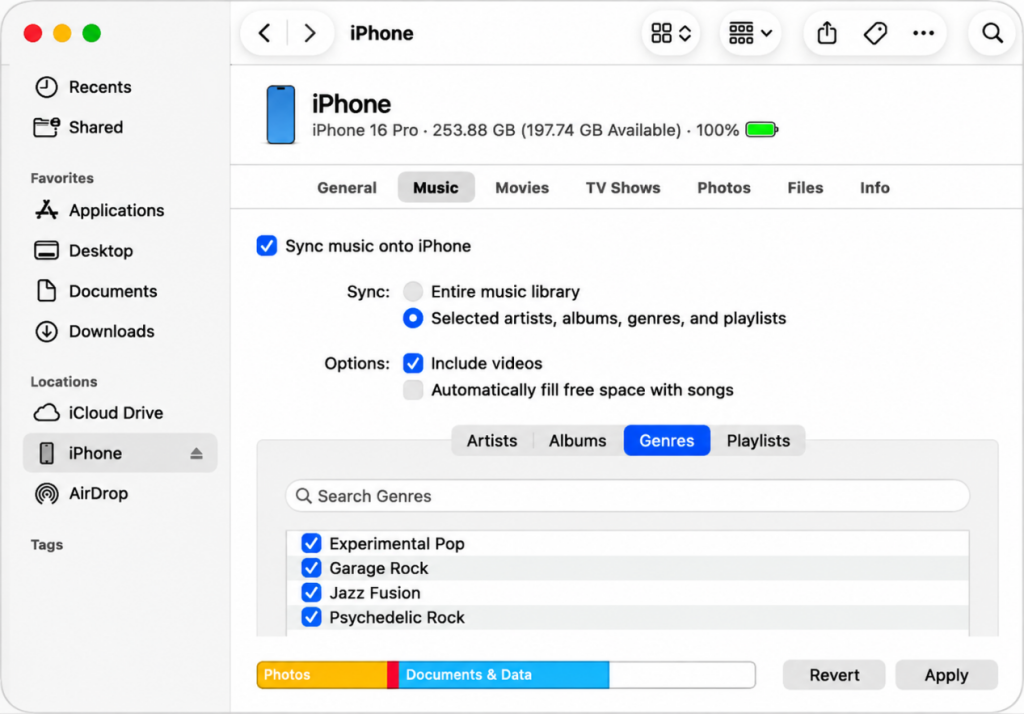
If you want to transfer a larger collection of M4A songs, Finder synchronization is another option.
Step 1. Connect your iPhone to your Mac using a USB or USB-C cable.
Step 2. Open Finder and select your iPhone from the sidebar.
Step 3. Click the Music tab.
Step 4. Enable music syncing and select the content you want to transfer.
Step 5. Review the selection, then click Apply or Sync.
FAQs About SoundCloud to M4A
1Is M4A good for a local music library?
Yes. M4A supports common metadata such as track titles, artists, album information, and artwork. This makes it a practical format for organizing and managing a local music collection.
2Does converting SoundCloud to M4A improve audio quality?
No. Converting a lower-quality source to M4A cannot add audio information that was not present in the original. The output format can change, but the source quality remains the main factor.
3What bitrate should I use when converting SoundCloud to M4A?
For everyday listening, 256 kbps AAC is a practical choice that offers a good balance between audio quality and file size. If you prioritize smaller files, a lower bitrate may be sufficient, while higher bitrates are only useful when the source audio can support them.
In Conclusion
Converting SoundCloud music to M4A can be a practical way to build and manage a local music library, especially if you prefer AAC compression and Apple device compatibility. For occasional single-track downloads, an online converter may be enough, while MusicFre is better suited to playlists and batch conversions.
Once your M4A files are ready, you can organize them on your Mac, transfer them to your iPhone, and enjoy your music offline. Just make sure you have the necessary rights or permission to save and convert the content.