
 中文 (台灣)
  日本語
日本語  한국어
한국어  Italiano
  Français
  Português
  Español

How to Convert Spotify to FLAC on PC/Mac [2026]
- Category:Spotify Music Tips
- Kate
- 2026-07-24
Are your favorite Spotify songs and playlists still unavailable in FLAC when you want to enjoy them offline? That carefully curated playlist or favorite album deserves to be saved in a high-quality format, not limited by device compatibility or an internet connection. This is where a reliable Spotify to FLAC converter becomes essential.
Whether you are an audiophile looking for better sound on a home audio system, a music lover archiving Spotify playlists, or simply someone who wants to play Spotify songs on more devices, converting Spotify music to FLAC can make a real difference. But with so many Windows, Mac, and online tools available, how do you find a safe and effective solution?
This guide will walk you through what FLAC is, whether Spotify supports FLAC quality, when a Spotify FLAC converter may be useful, and how to choose the right method for different listening needs. Keep reading to find the most suitable Spotify to FLAC solution for you.
Disclaimer: This guide is intended for personal and lawful use only. Please respect copyright laws, artist rights, and Spotify’s terms of use when saving or converting music.
Can You Convert Spotify to FLAC?
Yes, in many cases, Spotify music can be saved or played in FLAC quality, but it depends on what you want to achieve. Generally, there are two different situations to consider:
- Streaming Spotify in FLAC Quality: Spotify now offers Lossless audio for eligible Premium users in supported markets. According to Spotify, Lossless can stream tracks in up to 24-bit/44.1 kHz FLAC on supported devices. If your goal is simply to enjoy better sound quality within the Spotify app, enabling Spotify Lossless is the most direct option.
- Saving Spotify Songs as Local FLAC Files: Another common need is to save Spotify songs, albums, or playlists as local FLAC files. This allows you to play them with media players like VLC, transfer them to a USB drive, store them on a NAS, use them with a hi-fi player, or organize them in a personal music library.
In this case, Spotify’s official offline mode may not be enough, because downloaded songs are only playable inside the Spotify app. To get standard FLAC files for broader playback, you may need a powerful Spotify music converter.
Why Convert Spotify Music to FLAC?
Although Spotify allows Premium users to download songs for offline listening, those downloads are still tied to the Spotify app. You cannot directly move them to a USB drive, import them into a local music player, burn them to a CD, or play them on a FLAC-compatible hi-fi device.
That is why some users prefer to convert Spotify music to FLAC. Compared with MP3, FLAC, which stands for Free Lossless Audio Codec, is better suited for users who care about audio preservation, music library management, and broader playback compatibility. It can keep more audio detail than compressed formats while also supporting useful track information such as song title, artist, album, and cover art.
Converting Spotify to FLAC can be useful when you want to:
- Save Spotify songs, albums, or playlists as local audio files
- Play Spotify music on FLAC-supported players, car stereos, or home audio systems
- Transfer music to a USB drive, SD card, NAS, or portable music player
- Organize a personal music library with album information and cover art
- Keep playlists available when the network is unstable, or Spotify is not supported on a device
- Use a higher-quality format for personal listening instead of smaller compressed files
However, it is also important to understand that FLAC itself does not automatically improve the original audio quality. If the source audio is already compressed, saving it as FLAC will not recreate lost details. For the best result, choose a Spotify to FLAC converter that supports high-quality output and preserves metadata properly.
Does Spotify Offer FLAC Quality Officially?
Yes. Spotify has launched Lossless audio for Premium users in eligible markets. Spotify’s official announcement says users can stream tracks in up to 24-bit/44.1 kHz FLAC across nearly every song available on Spotify. Spotify Support also explains that users can enable Lossless from Settings and privacy > Media quality for Wi-Fi, cellular streaming, or downloads.
This means that if your goal is only to listen to Spotify in better quality, the official Spotify Lossless option should be your first choice.
However, there are a few things to know:
- Lossless may not be available in every market or on every device.
- You need a Spotify Premium account.
- Bluetooth headphones may not fully preserve lossless quality.
- Offline downloads remain inside the Spotify app.
- Official downloads are not standard FLAC files that you can freely move to any player.
So, official Spotify Lossless is excellent for listening inside Spotify, while a Spotify to FLAC converter is usually searched by users who want local FLAC files for broader playback needs.
Spotify Lossless vs Spotify to FLAC Converter: Which Option Is Better?
We’ve structured this comparison starting with the official option, followed by practical alternatives for different listening and file-saving needs.
| Option | Best For | Output | Main Limitation |
| Spotify Lossless | Listening inside Spotify with better quality | In-app lossless playback/downloads | Files stay inside Spotify |
| Spotify to FLAC Converter | Saving Spotify songs/playlists as FLAC files | Local FLAC files | Must be used responsibly and lawfully |
| Online Spotify to FLAC Converter | Occasional quick conversion | Usually FLAC/MP3 downloads | Quality, safety, and reliability may vary |
| Audio Recorder | Recording playback in real time | FLAC/WAV/MP3 depending on settings | Slower and may lose metadata |
| Other Lossless Music Services | True FLAC library building | FLAC from supported platforms | Requires another platform or purchase |
MusicFre – Convert Spotify to FLAC with No Quality Loss [PC/Mac]
Spotify Premium allows you to download songs for offline listening, but the downloaded tracks can only be played within the Spotify app. If you want to save Spotify songs, albums, or playlists as local FLAC files for a media player, USB drive, car stereo, or hi-fi device, MusicFre can be a more practical solution. It is designed to help users convert Spotify music to common audio formats such as FLAC, MP3, WAV, or other supported formats, so you can manage your Spotify music library more flexibly for personal offline listening.





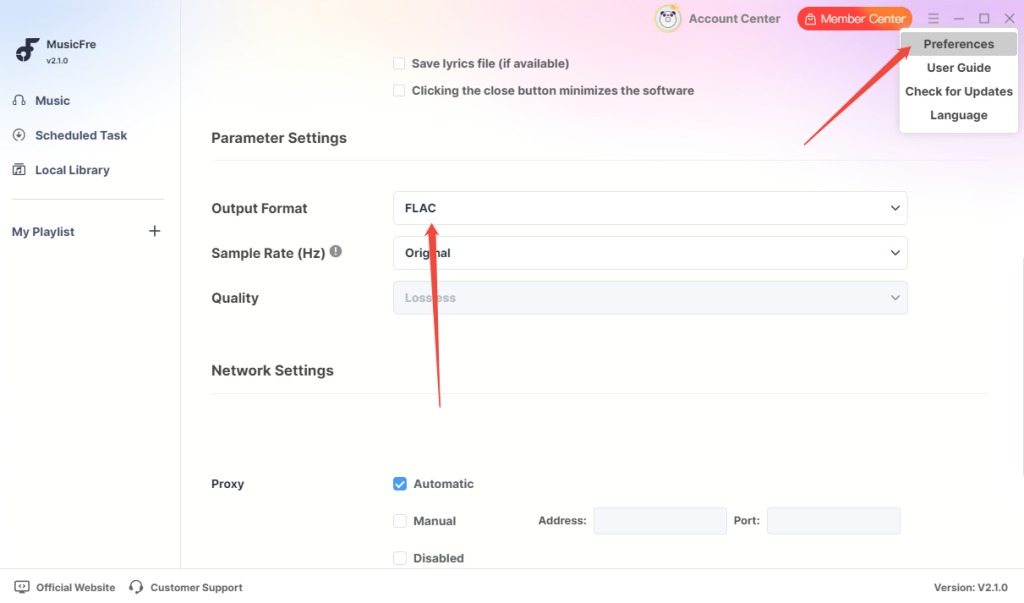
Step 1. Download MusicFre on your Windows or Mac computer. Go to “Menus” -> “Preferences”, select “FLAC” in the Output Format.
Step 2. Tap on the “Music” tab in the left sidebar. Select “Spotify” and search for the song, album, or playlist you want to convert. You can also paste a Spotify link, then click “Analyze,” and it will automatically detect the music information.
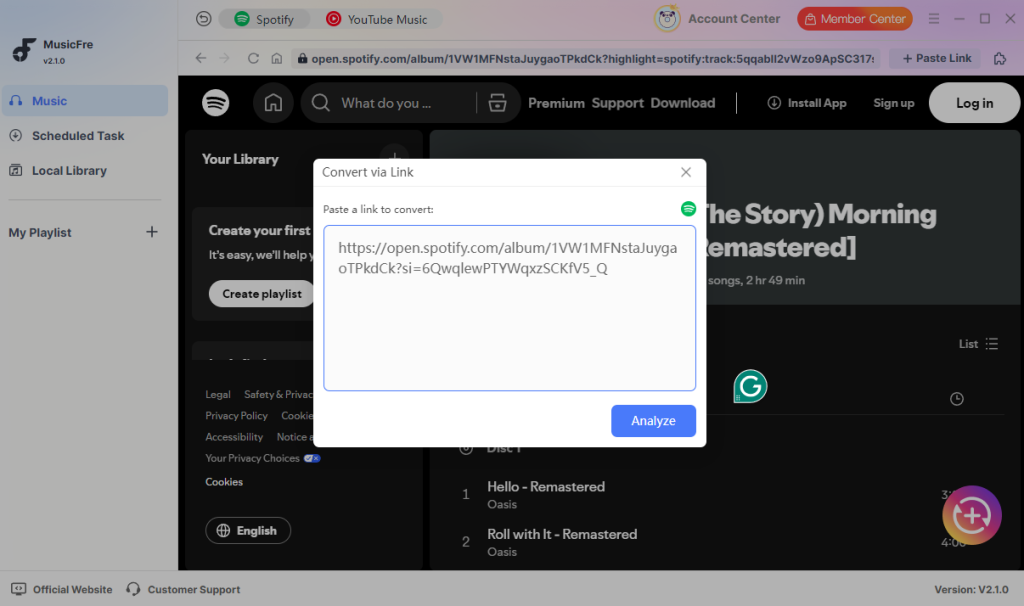
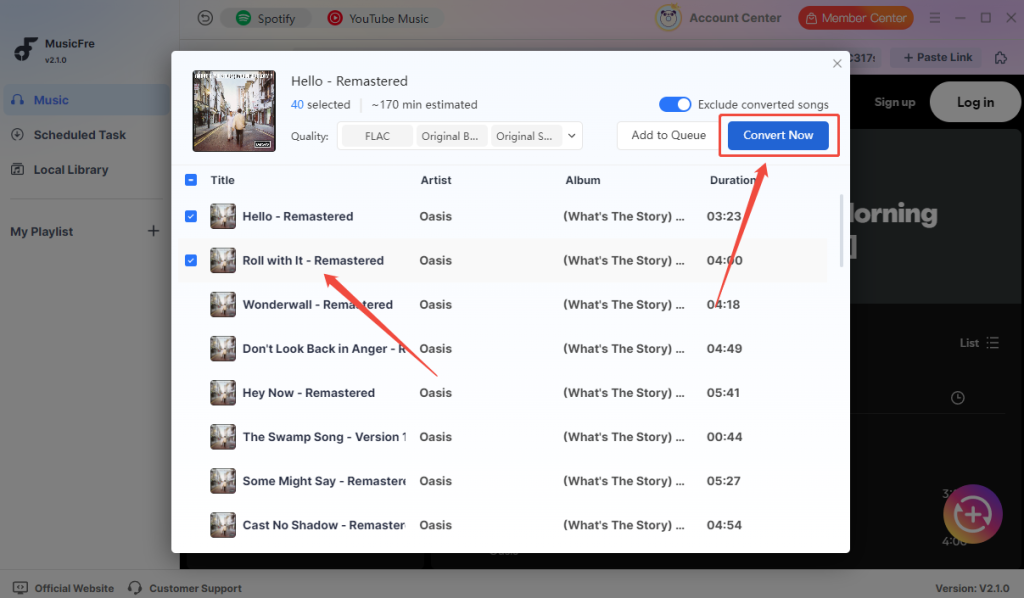
Step 3. Click the “Convert Now” button, and it will process the selected tracks and save them to your chosen folder.
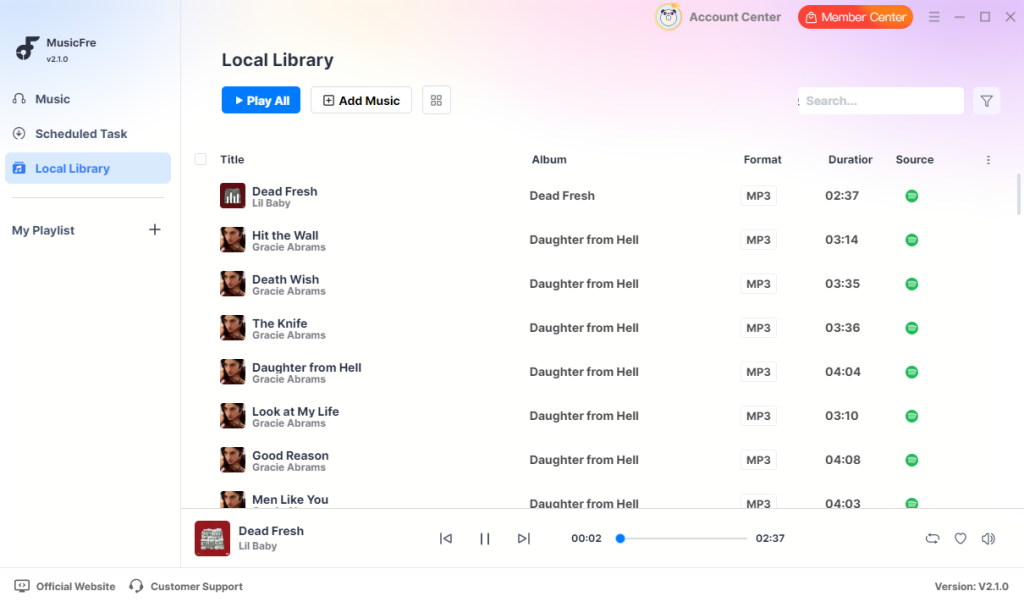
Step 4. Once completed, you can press “Go to the output folder” or check the downloads in the “Local Library” tab. You can also play them within the built-in player.
How to Convert Spotify to FLAC Online with SpotyLoader
If you do not want to install desktop software, an online Spotify to FLAC converter can be a convenient option for quick conversion. SpotyLoader is one browser-based tool that claims to support Spotify track, album, playlist, and podcast links, with output formats such as MP3, FLAC, M4A, and WAV. The steps below show how to convert Spotify music and save it on your Windows or Mac computer.
Step 1. Open Spotify and find the song you want to convert. Click or tap the Share option, then copy the Spotify link.
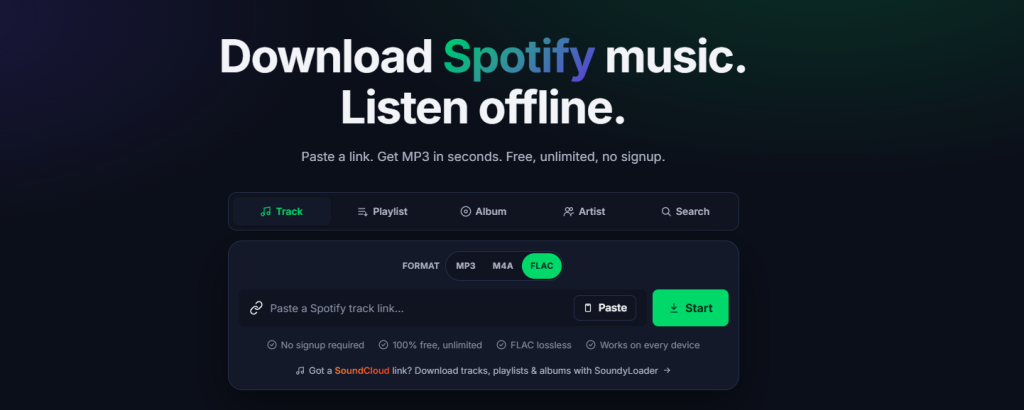
Step 2. Go to the SpotyLoader website and paste the Spotify URL into the input box.
Step 3. Select FLAC as the output format.
Step 4. Click the “Start” button and wait for the online converter to process the Spotify link. Once the file is ready, save the converted FLAC file to your device.
Step 5. After downloading, play the file with a music player such as VLC, foobar2000, MusicBee, or AIMP.
Is Spotify to FLAC Truly Lossless?
This is an important question. A file ending in .flac is not always truly lossless. If the original source is lossy or compressed, converting it to FLAC will not magically restore missing audio data.
For example:
- Converting a low-quality stream to FLAC only creates a larger file.
- Converting MP3 to FLAC does not improve the original quality.
True lossless quality depends on the original audio source and the tool’s processing method.
Since Spotify now supports Lossless for Premium users in supported markets, the best quality usually comes from enabling Spotify Lossless first where available. If you use a converter, choose one that clearly supports high-quality output and avoid tools that simply upscale compressed audio. Here is a full comparison table between FLAC, MP3, and other audio formats.
| Format | Best For | File Size | Quality |
| FLAC | Hi-fi listening, archiving, home audio | Larger | Lossless when the source supports it |
| MP3 | Phones, car players, smaller storage | Smaller | Lossy |
| WAV | Editing and uncompressed audio | Very large | Lossless/uncompressed |
| ALAC | Apple ecosystem | Medium-large | Lossless |
| AAC/M4A | Mobile playback | Smaller | Lossy but efficient |
Choose FLAC if quality matters more than storage. Choose MP3 if you need smaller files for phones, car stereos, or older players.
FAQs About Converting Spotify to FLAC
1What is the best Spotify to FLAC converter?
The best Spotify to FLAC converter depends on your needs. For occasional use, an online Spotify music converter may be enough. For playlist conversion, better quality control, and metadata preservation, MusicFre is usually more practical.
2Can I convert Spotify playlist to FLAC?
Yes, many Spotify to FLAC converters support playlist conversion. Look for batch conversion, playlist detection, and metadata preservation if you need to convert many tracks at once.
3Can Spotify download FLAC files officially?
Spotify Premium users can enable Lossless quality in supported markets and devices, but official downloads stay inside the Spotify app. They are not exported as normal FLAC files for use in other players.
4Is Spotify Lossless the same as FLAC?
Spotify Lossless uses FLAC quality up to 24-bit/44.1 kHz, according to Spotify. However, listening to Spotify Lossless is different from exporting local FLAC files.
The Bottom Line
Spotify is the world’s leading audio streaming platform, but saving songs as FLAC files may require more than using its built-in download feature. By choosing a powerful Spotify music converter and correctly setting the output format, audio quality, and save location, you can store Spotify music on your computer and manage it locally. Following the correct steps on Mac or Windows helps make the conversion easier and prevents issues during downloading or playback.
subscription
payment
guarantee