

 中文 (台灣)
  日本語
日本語  한국어
한국어  Italiano
  Français
  Português
  Español

How to Download a Spotify Album to MP3 (2026 Guide)
- Category:Spotify Music Tips
- Xiny
- 2026-08-15
Want to download a Spotify album as an MP3 for offline playback on more devices? Whether you want to organize a full album in your local music library, play it in your car, or transfer it to a compatible MP3 player, standard audio files offer more flexibility than app-only downloads.
This guide compares MusicFre, Spotify Premium, and online downloaders to help you choose the right option for offline listening or local music files. Before saving any music locally, make sure you have the necessary rights or permission to do so and comply with applicable copyright laws and Spotify’s terms of use.
Can You Download a Spotify Album to MP3 Directly?
No. Spotify does not provide a direct option to download an album as standard MP3 files.
Spotify Premium users can download albums for offline listening, but these downloads are protected by DRM. The files:
- Can only be played inside the Spotify app
- Cannot be moved to MP3 players, USB drives, or other music devices
- Cannot be exported as normal MP3 or audio files
- May become unavailable if your Premium subscription ends
This means Spotify’s offline download feature is useful for listening without an internet connection, but it is different from saving music as local MP3 files. This is why many users look for a way to download Spotify albums to MP3. MP3 files are easier to organize in a local music library and can be played on more devices, including computers, car stereos, and portable music players.
For music you are authorized to save, saving it in MP3 format also makes it easier to organize useful details, including the song title, artist name, album name, track number, and cover artwork.
How to Download Albums from Spotify to MP3?
There are several ways to save Spotify albums for offline listening, but the result is not always the same. Spotify Premium lets you listen to downloaded albums inside the Spotify app, while MusicFre and some online Spotify album downloaders help you save music in a standard audio format.
Below are three common methods for downloading a Spotify album. Choose the one that best fits how you want to listen to and manage your music.
Method 1.Save Spotify Albums as MP3 with MusicFre
MusicFre is designed for users who want to convert a Spotify album to MP3 and keep their music files locally. Once saved, the files can be played with most media players or transferred to compatible devices. You can use the album link to process an entire release instead of handling tracks one by one.






Here is how to save a Spotify album as MP3 with MusicFre:
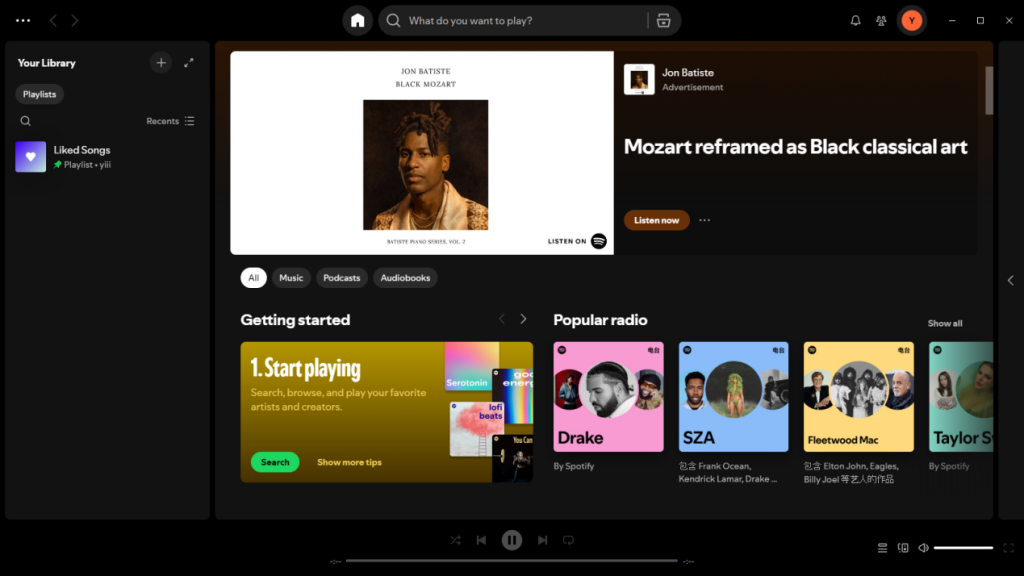
Step 1. Open Spotify and find the album you want to download.
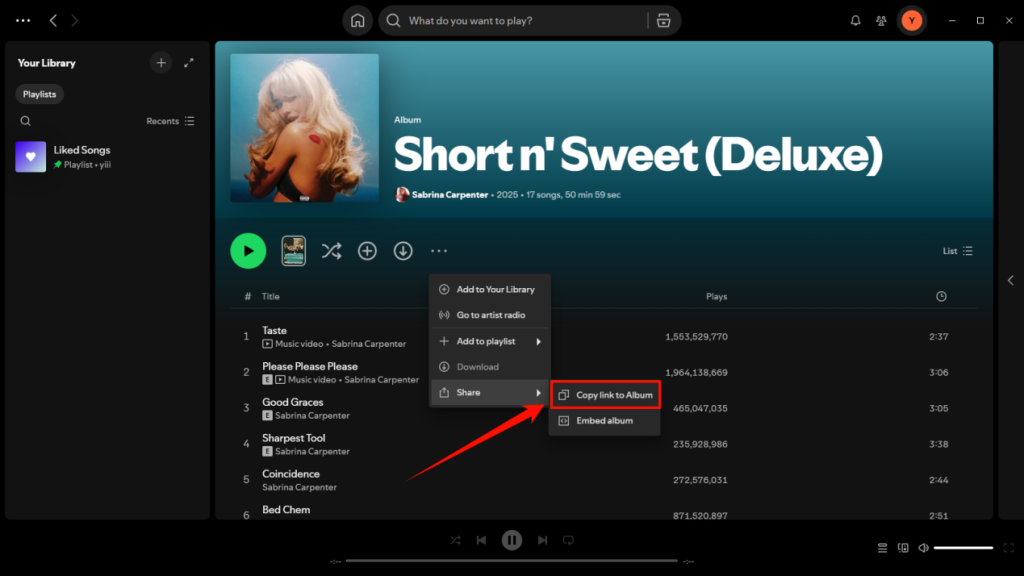
Step 2. Click the three-dot menu next to the album title, then select “Share” > “Copy link to Album”.
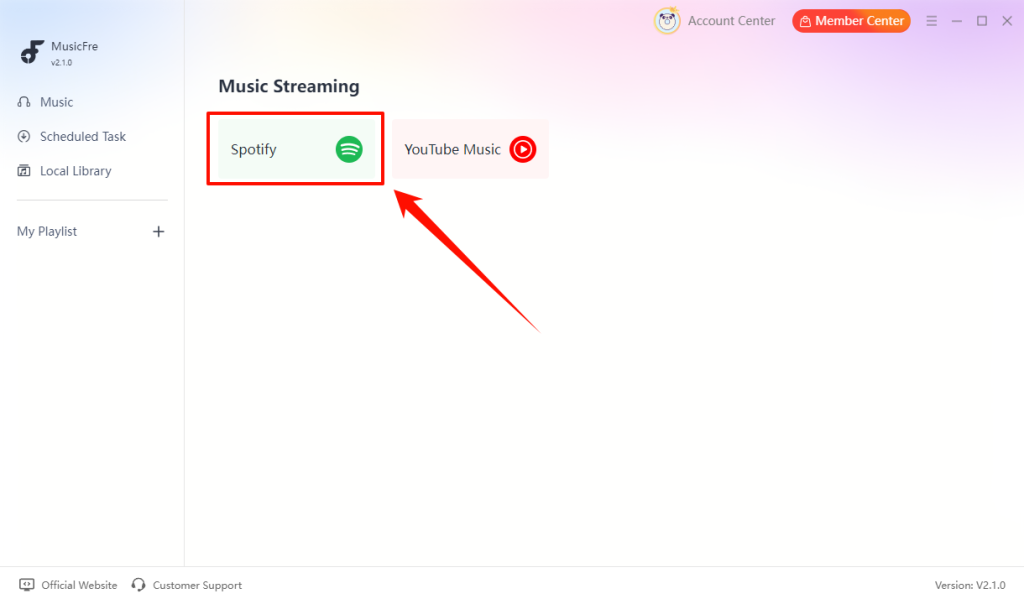
Step 3. Open MusicFre and go to the “Spotify” music section.
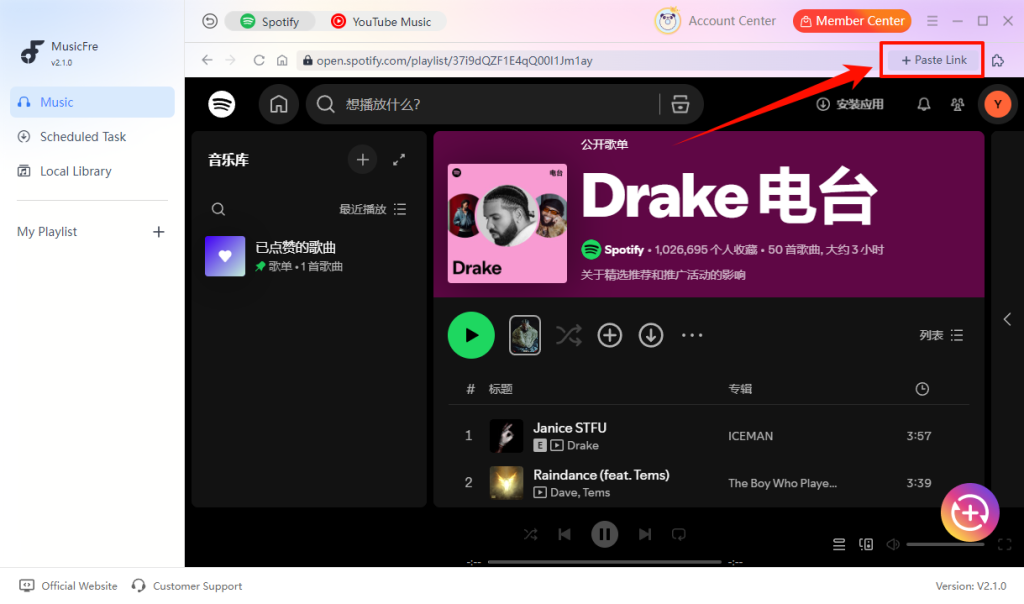
Step 4. Click “Paste Link” in the upper-right corner and paste the copied album link into the input box.
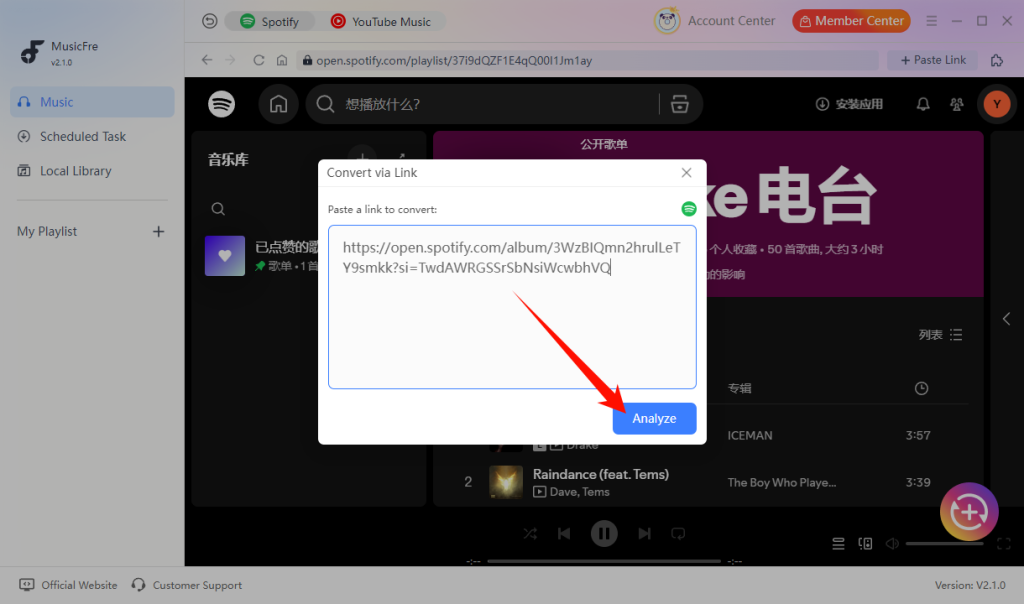
Step 5. Tap the “Analyze” button, then wait for MusicFre to load the album details.
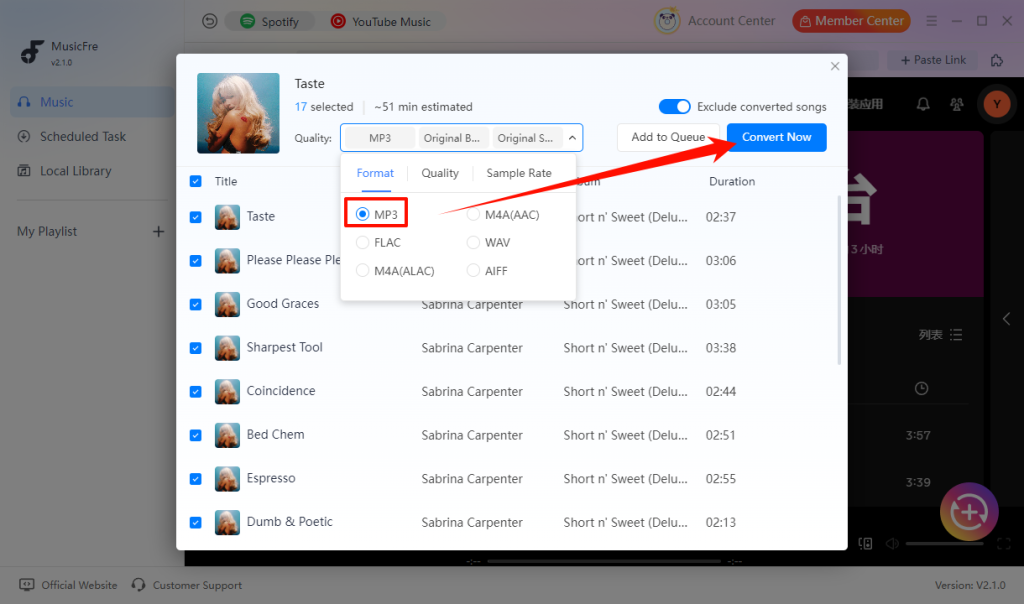
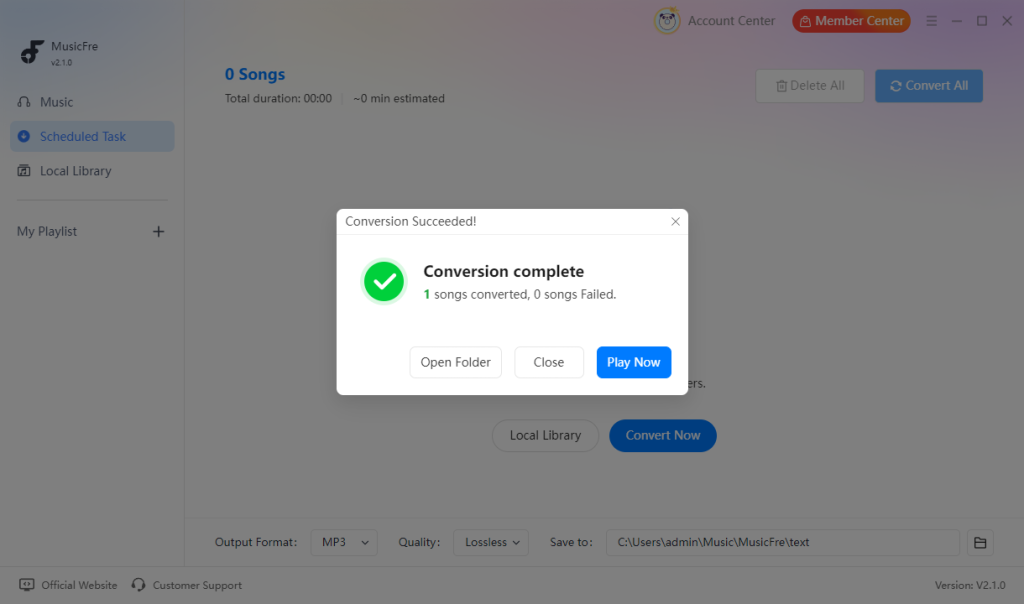
Step 6. Choose “MP3” as the output format, click “Convert Now” and wait for the process to complete.
Step 7. Once finished, your Spotify album will be saved as MP3 files on your computer.
Method 2.Listen to Spotify Albums Offline with Spotify Premium
Spotify Premium provides an official way to download albums for offline listening. This is the safest option if you simply want to listen without an internet connection. However, if you want to save a Spotify album as an MP3 or use music on other devices, a converter is required.
Follow the steps below to enable offline playback for a Spotify album:
Step 1. Open the Spotify app on your phone, tablet, or computer.
Step 2. Search for and open the album you want to listen to offline.
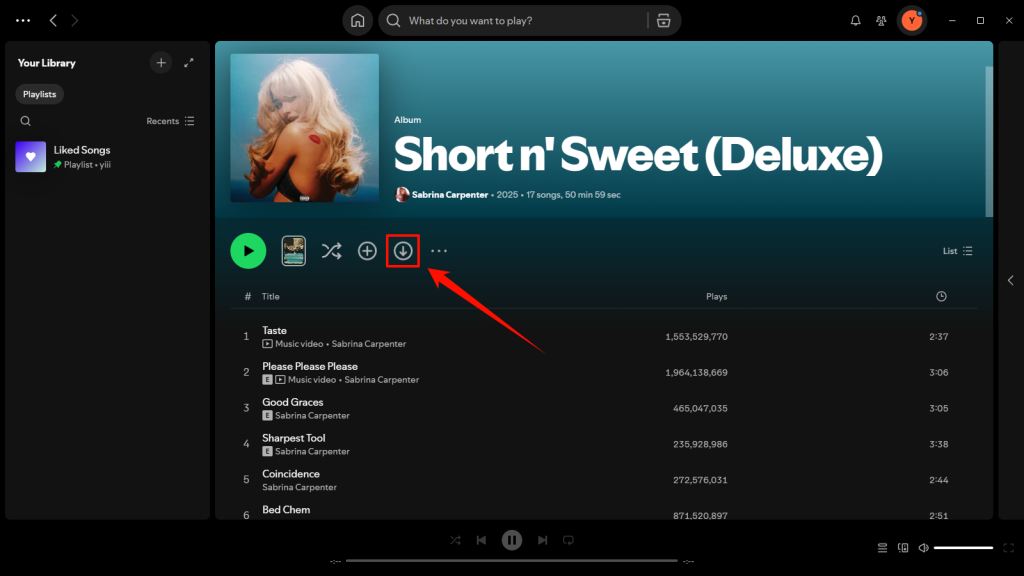
Step 3. Turn on the “Download” switch on the album page.
Step 4. Wait until the download icon shows that the album is available offline.
Step 5. Go to Your Library to play the album without an internet connection.
Method 3.Use an Online Spotify Album Downloader
An online Spotify album downloader can be useful when you do not want to install desktop software. Most services work through a web browser and ask you to paste a Spotify album link. Before using an online tool, check whether it supports full albums, preserves track information, and works in your region.
While the exact interface varies by service, the typical workflow looks like this:
Step 1. Copy the Spotify album link from the Spotify app or web player.
Step 2. Visit a Spotify downloader website that supports album links.
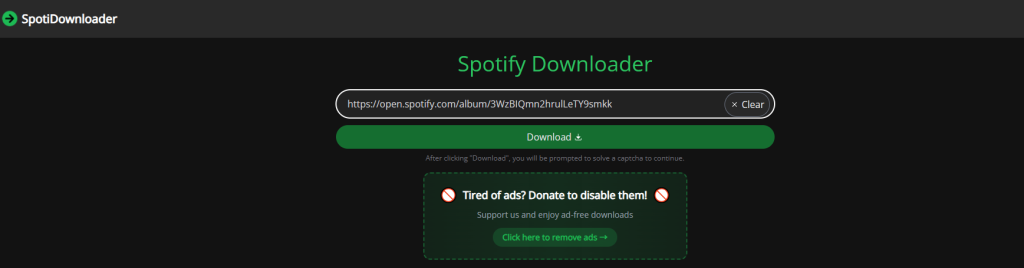
Step 3. Paste the copied Spotify album URL into the input box.
Step 4. Choose MP3 as the output format if supported.
Step 5. Click the download button and wait for the tool to process the album.
Note: Avoid websites that ask for your Spotify password, require unnecessary extensions, or display misleading download buttons.
MusicFre vs. Spotify Premium vs. Online Downloaders
Each method has a different purpose. The table below compares MusicFre, Spotify Premium, and online Spotify album downloaders to help you choose the option that best fits your needs.
| Feature | MusicFre | Spotify Premium | Online Downloaders |
| MP3 Output | Yes | No | Varies by service |
| Full Album Download | Yes | Yes, for offline playback in the Spotify app | Varies by service |
| Audio Quality | Excellent | Based on Spotify playback quality settings | Varies by service |
| Local File Access | Yes | No | Usually yes, if files are available |
| Transfer to Other Devices | Yes, for compatible devices | No | Usually yes, depending on the file format |
| Track Information & Album Art | Preserves song titles, artist names, album details, track order, and cover artwork | Available only inside the Spotify app | May be incomplete or unavailable |
| Software Installation | Required | Required | Usually not required |
| Best For | Saving Spotify albums as local files | Offline listening inside Spotify | Occasional browser-based use |
FAQs About Spotify Album to MP3
1Can I download an entire Spotify album at once?
Yes. A Spotify music converter like MusicFre can process a full album at once, so you do not need to convert each song individually.
2Why are some tracks missing from a Spotify album?
Some tracks may be unavailable because of regional restrictions, licensing changes, or changes made by the artist or label.
3Will the downloaded files keep the original album order?
Yes. MusicFre can preserve important album information, including track order, song titles, artist names, and album details.
4Which MP3 quality should I choose for a Spotify album?
For most users, 320 kbps MP3 provides a good balance between sound quality and file size. Lower bitrates save storage space, while higher-quality formats are better for audio enthusiasts.
In Conclusion
Downloading a Spotify album to MP3 depends on what you want to achieve. Spotify Premium is a suitable option for offline playback within the Spotify app, while online downloaders can be useful when you prefer a browser-based solution. If you want to build a local music library and enjoy full albums on compatible devices, MusicFre offers a more flexible workflow.
Choose the option that best fits your listening habits and device needs. With the right method, you can enjoy your favorite albums more conveniently while keeping your music collection organized.