
 中文 (台灣)
  日本語
日本語  한국어
한국어  Italiano
  Français
  Português
  Español

How to Put Spotify Music on iPod: 2 Methods in 2026
- Category:Spotify Music Tips
- Xiny
- 2026-08-14
Although Apple discontinued the iPod lineup, many people still use iPod touch, Classic, Nano, and Shuffle devices for offline music playback. If you want to download Spotify music to an iPod, the available method depends on your device model.
Some iPod touch devices may still work with a compatible legacy version of Spotify, while older iPod models can only play local audio files synced from a computer. In this guide, we will show you how to put Spotify music on iPod in different ways. Let’s get started.
Can You Download Spotify Music to iPod? (Quick Check)
It depends on which iPod model you have.
As of August 2026, no iPod can install the current Spotify app. The newest model, iPod touch 7th generation, supports up to iOS 15.8.8, while the current Spotify app requires iOS 16.1 or later. Some iPod touch users may still have access to a compatible legacy version of Spotify, but availability and functionality are not guaranteed.
Older models, including iPod Classic, Nano, Shuffle, and Mini, cannot run the Spotify app because they do not support modern iOS streaming apps. They can only play compatible local audio files synced from a computer.
Also, Spotify offline downloads are not regular audio files. They are protected and can only be played inside the Spotify app, which means they cannot be directly moved to an iPod for normal playback.
Here is a quick overview of iPod models, their maximum software versions, and Spotify support.
| iPod Model | Released | Discontinued | Capacity | Max iOS | Spotify Support |
| iPod touch 1st–4th Gen | 2007–2010 | 2008–2012 | 8GB–64GB | iPhone OS 3.1.3–iOS 6.1.6 | No |
| iPod touch 5th Gen | 2012 | 2015 | 16GB–64GB | iOS 9.3.5 | Legacy version only; not guaranteed |
| iPod touch 6th Gen | 2015 | 2019 | 16GB–128GB | iOS 12.5.8 | Legacy version only; not guaranteed |
| iPod touch 7th Gen | 2019 | 2022 | 32GB–256GB | iOS 15.8.8 | No current Spotify app |
| iPod Nano 1st–7th Gen | 2005–2012 | 2017 | 1GB–16GB | N/A | No |
| iPod Shuffle 1st–4th Gen | 2005–2010 | 2017 | 512MB–4GB | N/A | No |
| iPod Mini 1st–2nd Gen | 2004–2005 | 2005 | 4GB–6GB | N/A | No |
| iPod Classic / Original iPod Line | 2001–2007 | 2014 | 5GB–160GB | N/A | No |
How to Get Spotify Music on iPod touch?
If you have an iPod touch, you may still be able to use Spotify depending on your device model and the Spotify app version available for your iOS version.
However, as Apple no longer updates the iPod touch lineup and newer Spotify versions require newer iOS versions, compatibility is limited. Some older iPod touch devices may only work with previously installed or legacy versions of Spotify, and features may not be fully available.
To check whether Spotify works on your iPod touch and use it for offline listening, follow the steps below.
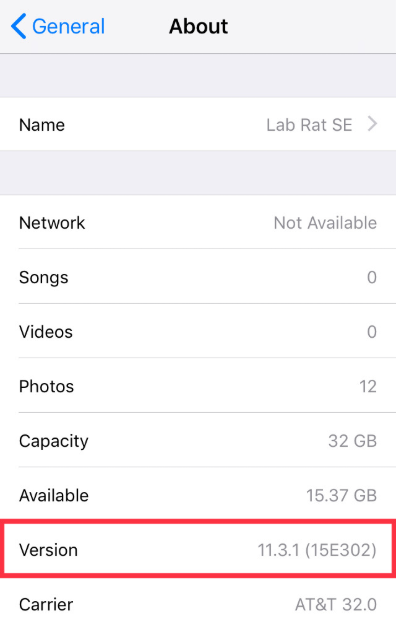
Step 1.Check Your iPod touch Software Version
1. Go to Settings > General > About and check your iOS version.
2. Open the App Store and search for Spotify.
3. If Spotify is available, install or update the app.
Step 2.Sign in to Your Spotify Account
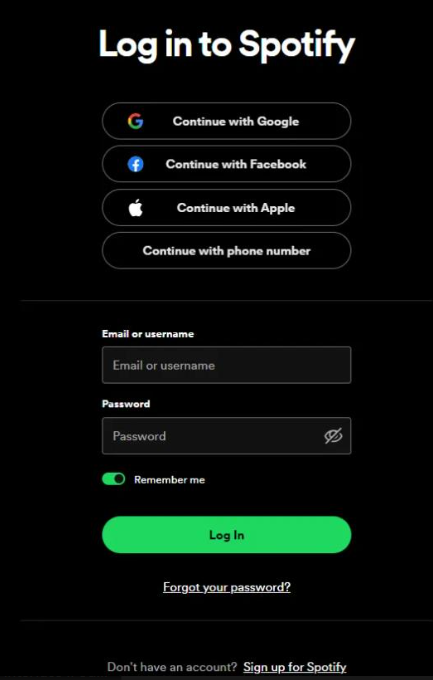
1. Open the Spotify app on your iPod touch.
2. Sign in with your Spotify account.
3. Search for songs, albums, or playlists you want to listen to.
Step 3.Download Spotify Music for Offline Listening
If you have a Spotify Premium account:
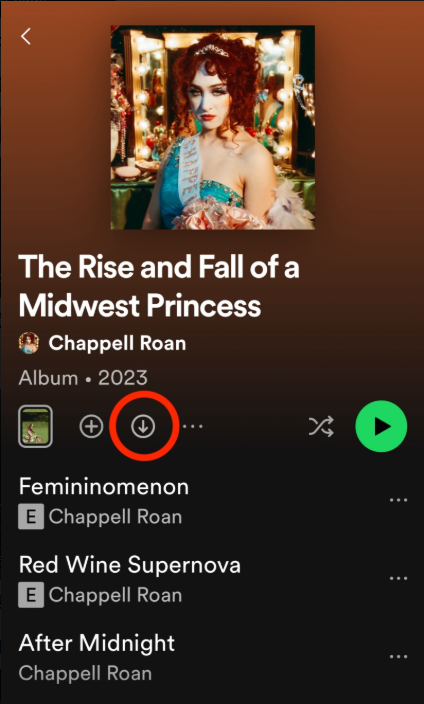
1. Open a playlist, album, or podcast.
2. Tap the Download button.
3. Wait until the download is complete.
4. Listen offline through the Spotify app.
However, these downloads are only available inside Spotify. They cannot be exported as MP3 files or transferred to another iPod device. If Spotify is unavailable or no longer works on your iPod touch, use the local-file method below instead.
How to Put Spotify Songs on iPod Without the Spotify App?
If you want to download Spotify music to iPod for playback without the Spotify app, the usual solution is to convert Spotify songs into common audio formats, such as MP3, and then sync them to your device.
Note: Before using any conversion or export tool, make sure your use complies with Spotify’s terms and applicable copyright rules.
The steps to put Spotify music on iPod are as follows.
Step 1.Convert Spotify Songs to iPod-Compatible Formats
The first step is to convert Spotify music into common audio formats supported by iPod, such as MP3 or AAC. MusicFre provides an easy way to prepare iPod-compatible local music files:
1. Download and install MusicFre on your computer.





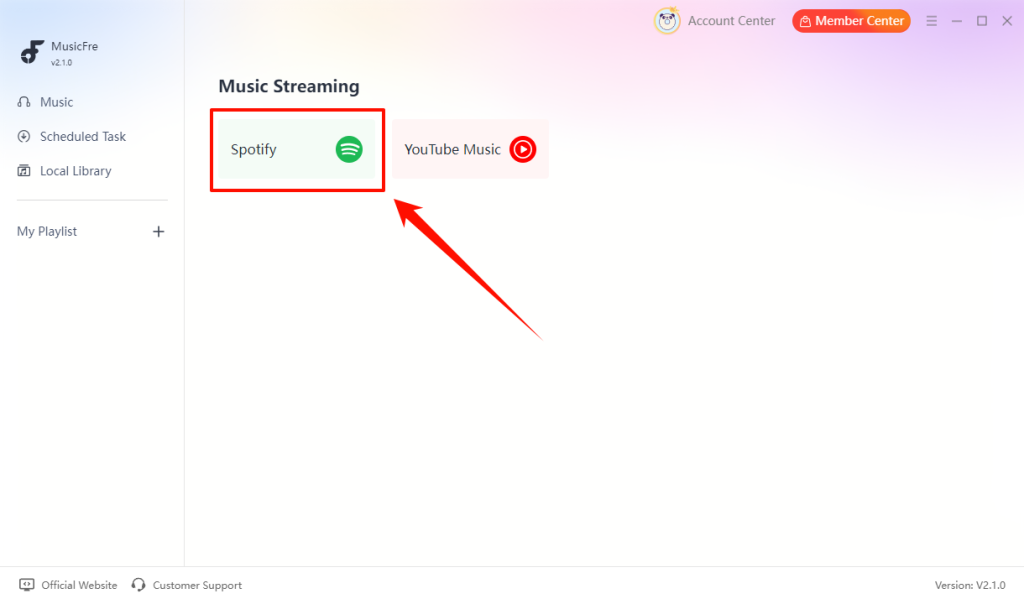
2. Launch MusicFre and select Spotify from the main interface.
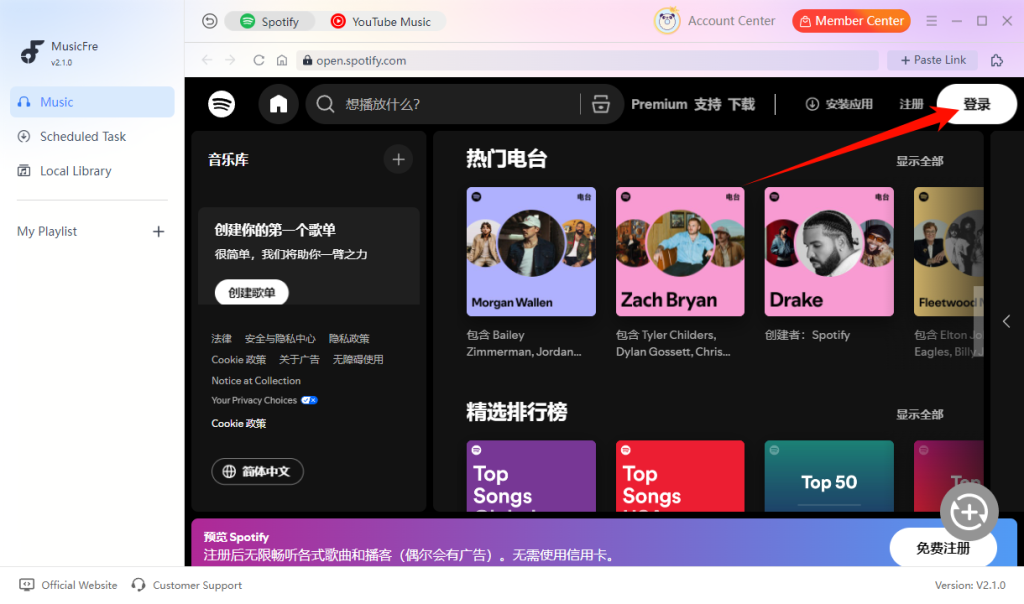
3. Log in to your Spotify account.
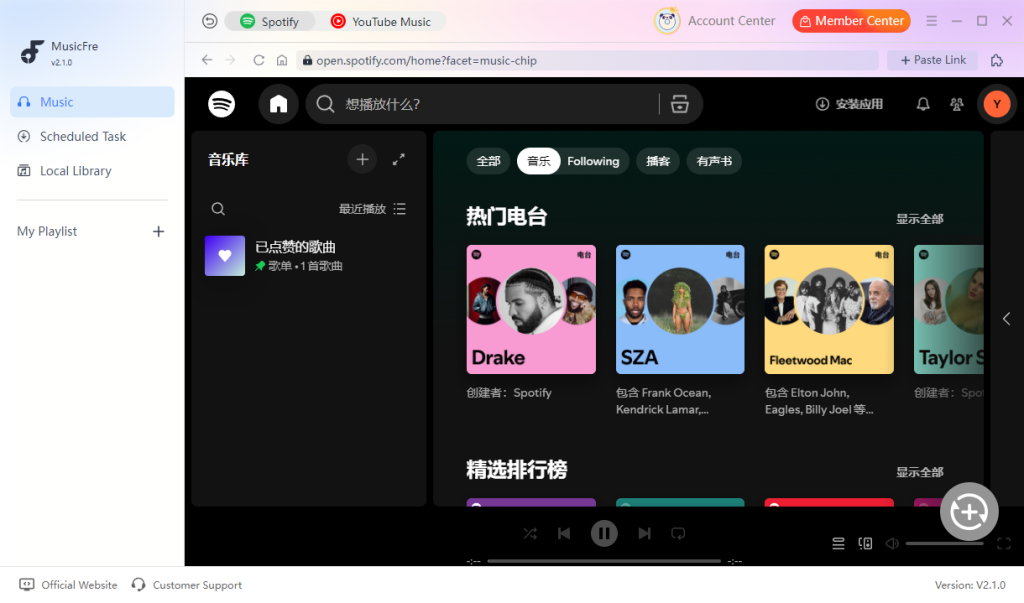
4. Search for the songs, albums, or playlists you want to transfer.
5. Click the “+” button to add the music to the conversion list.
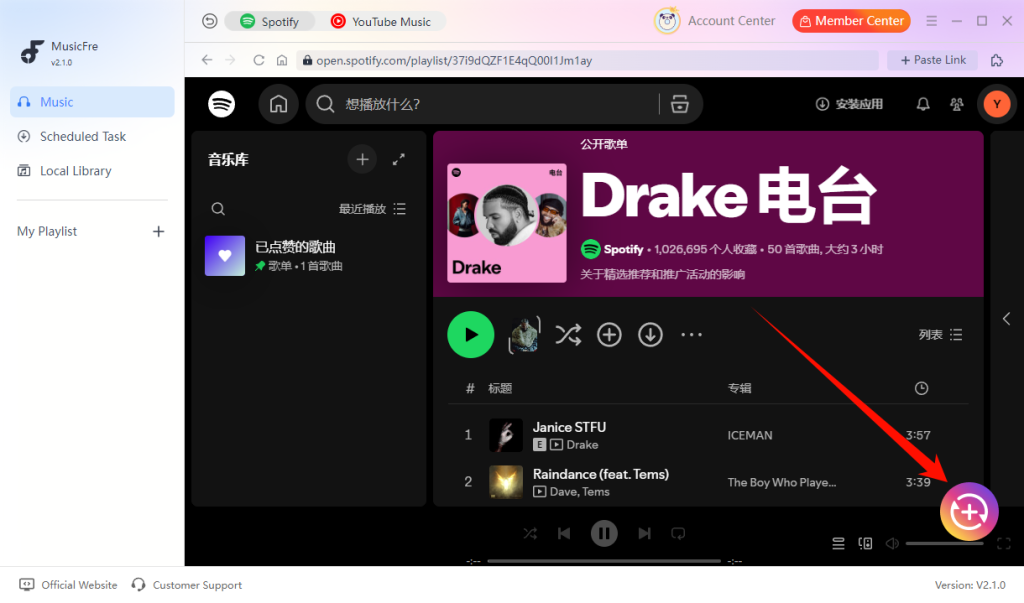
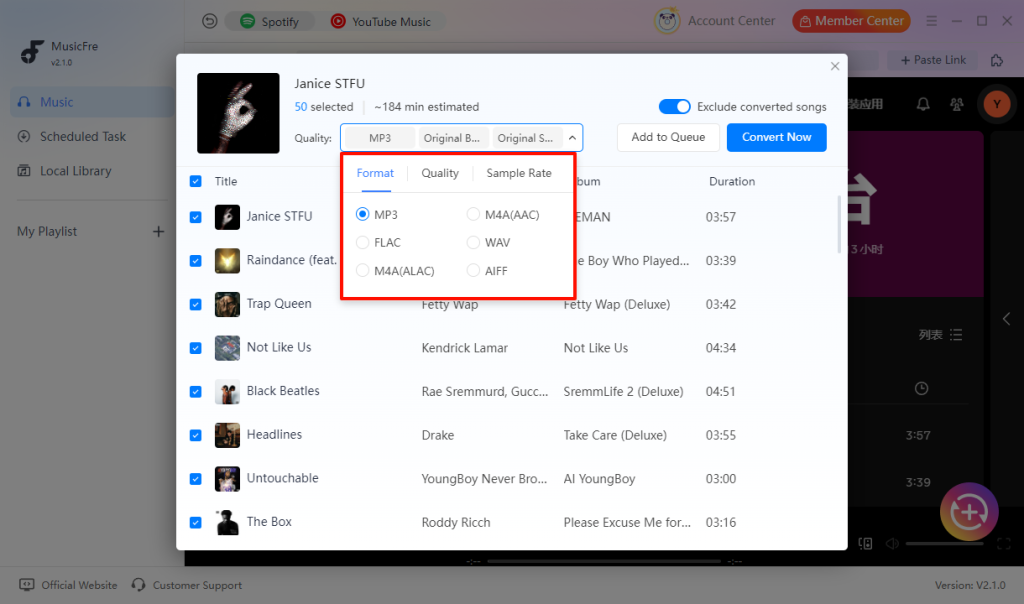
6. Select MP3 or another iPod-compatible output format.
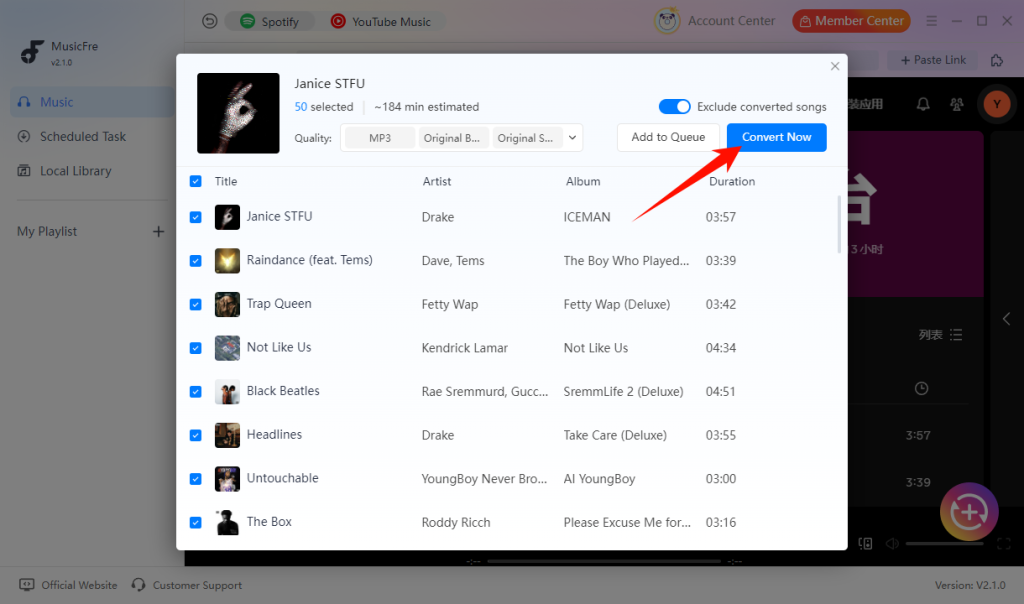
7. Click the “Convert Now” button to save Spotify songs as local files.
Step 2.Add the Converted Music Files to Your Library
After converting Spotify songs into regular audio files, add them to your music library before syncing them to your iPod.
On Windows:
1. Open iTunes on your computer.
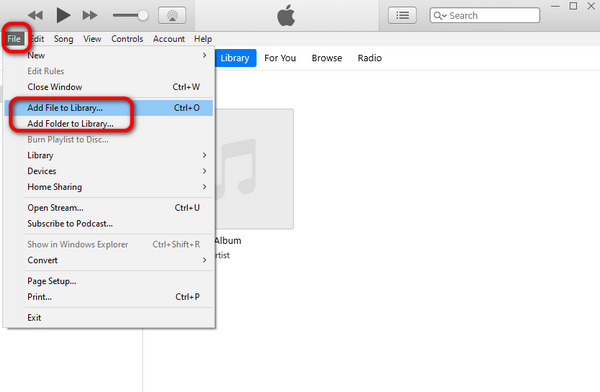
2. Click File > Add File to Library or File > Add Folder to Library.
3. Select the converted music files.
4. Wait for the files to appear in your iTunes music library.
On Mac:
1. Open the Music app on your Mac.
2. Click File > Add to Library.
3. Import the converted audio files.
4. Make sure the songs are available in your music library.
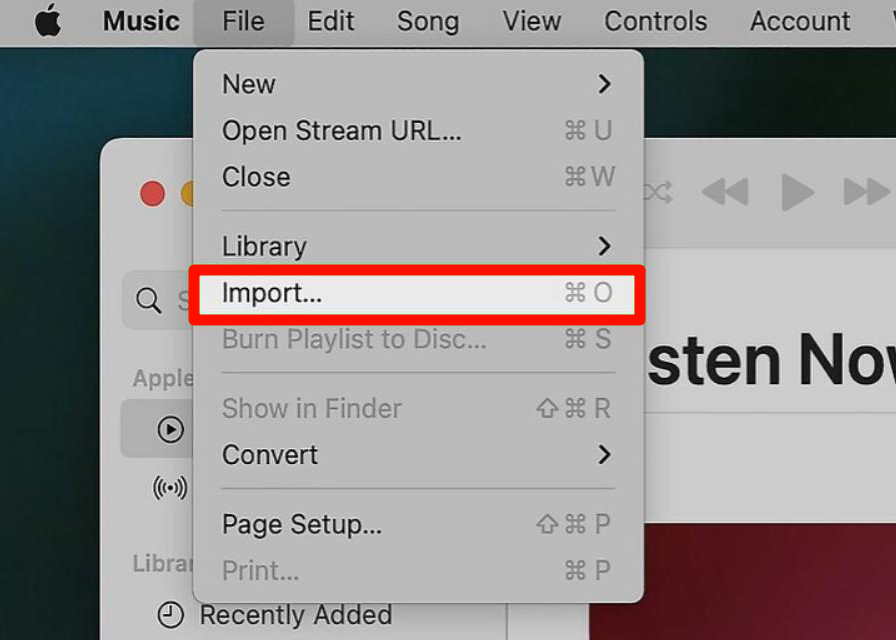
Step 3. Sync Spotify Music to Your iPod
After adding the music files, connect your iPod and transfer the songs:
1. Connect your iPod to the computer with a USB cable.
2. Open iTunes or Finder.
3. Choose the music files you want to sync.
4. Click Sync or Apply to begin syncing.
5. Wait until the transfer is complete.
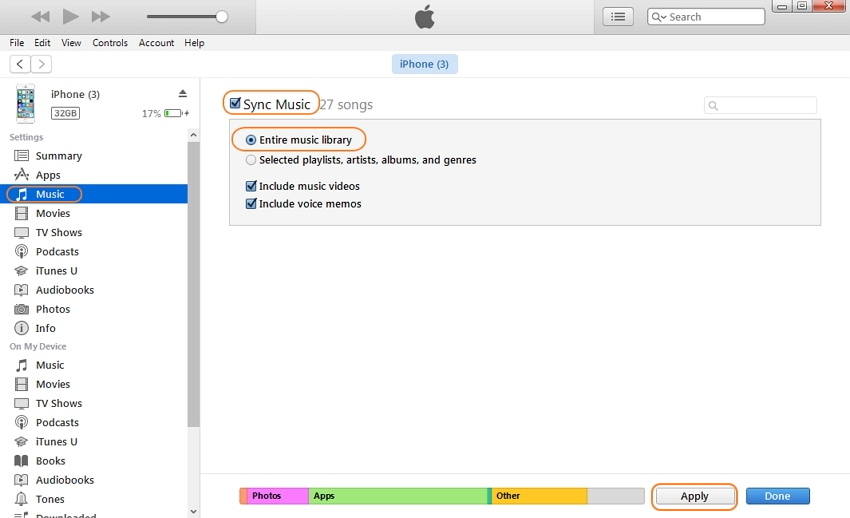
After syncing, you can open the Music app on your iPod and play Spotify songs like normal local music files.
FAQs About Downloading Spotify to iPod
1Can I download Spotify songs to iPod without Premium?
No. Spotify only allows offline downloads for Premium users inside the Spotify app.
2What audio format is best for iPod?
MP3 is the safest option for all iPod models. AAC is also supported and uses less storage. Avoid FLAC, as iPods do not natively support it.
3Why are my songs not showing on my iPod?
This usually happens because the songs were not synced correctly, the files are in an unsupported format, or the iPod library has not been refreshed. Check the file format and sync your iPod again.
4Does MusicFre preserve song metadata after conversion?
Yes. MusicFre can keep important song information, including titles, artists, albums, and cover artwork, in the converted files.
Final Words
Putting Spotify music on an iPod depends on the model you use. An iPod touch may still work with a compatible legacy version of Spotify, while iPod Classic, Nano, Shuffle, and Mini devices require compatible local audio files.
If the Spotify app is unavailable on your device, MusicFre can help you prepare iPod-compatible music files, which you can then sync through iTunes or Finder. Once the transfer is complete, you can enjoy your music on your iPod offline.